Start with the page
Keep the product promise, audience clue, offer, proof points, and visual details visible before writing scenes.

Product page ad staging
Turn a product URL or pasted page copy into extracted product facts, hook options, short-form scene prompts, camera notes, and a model-ready ad handoff.
Input
The starter LumaSip copy is fictional. Replace it with your own product page facts before publishing any generated ad.
Checklist
Use the checklist to confirm the source page has the buyer, offer, proof, visual context, and CTA needed for a stronger short-form ad prompt.
Leave this blank to download immediately. If you enter an email, it is used for the checklist follow-up you requested and may be sent to a configured lead endpoint; pasted source and generated outputs are not sent. See the privacy page.
Output
Enter a public product URL or paste product page copy, then generate hooks, scene prompts, camera notes, on-screen text, and a full handoff prompt.
Premium handoff preview
The full artifact is staged below as a scroll path: source facts, ad angles, scene prompts, QA notes, and export shape.
Scroll path
This is the premium presentation pattern: the page proves the finished workflow artifact before visitors use the free product-page ad workflow.
Keep the product promise, audience clue, offer, proof points, and visual details visible before writing scenes.
Turn the page into facts the ad can safely inherit, while leaving unsupported claims out of the handoff.
Convert source facts into hook options, ordered shots, camera notes, and on-screen-text ideas.
Send the prompt pack into QA so missing structure is easier to catch before spending model credits.
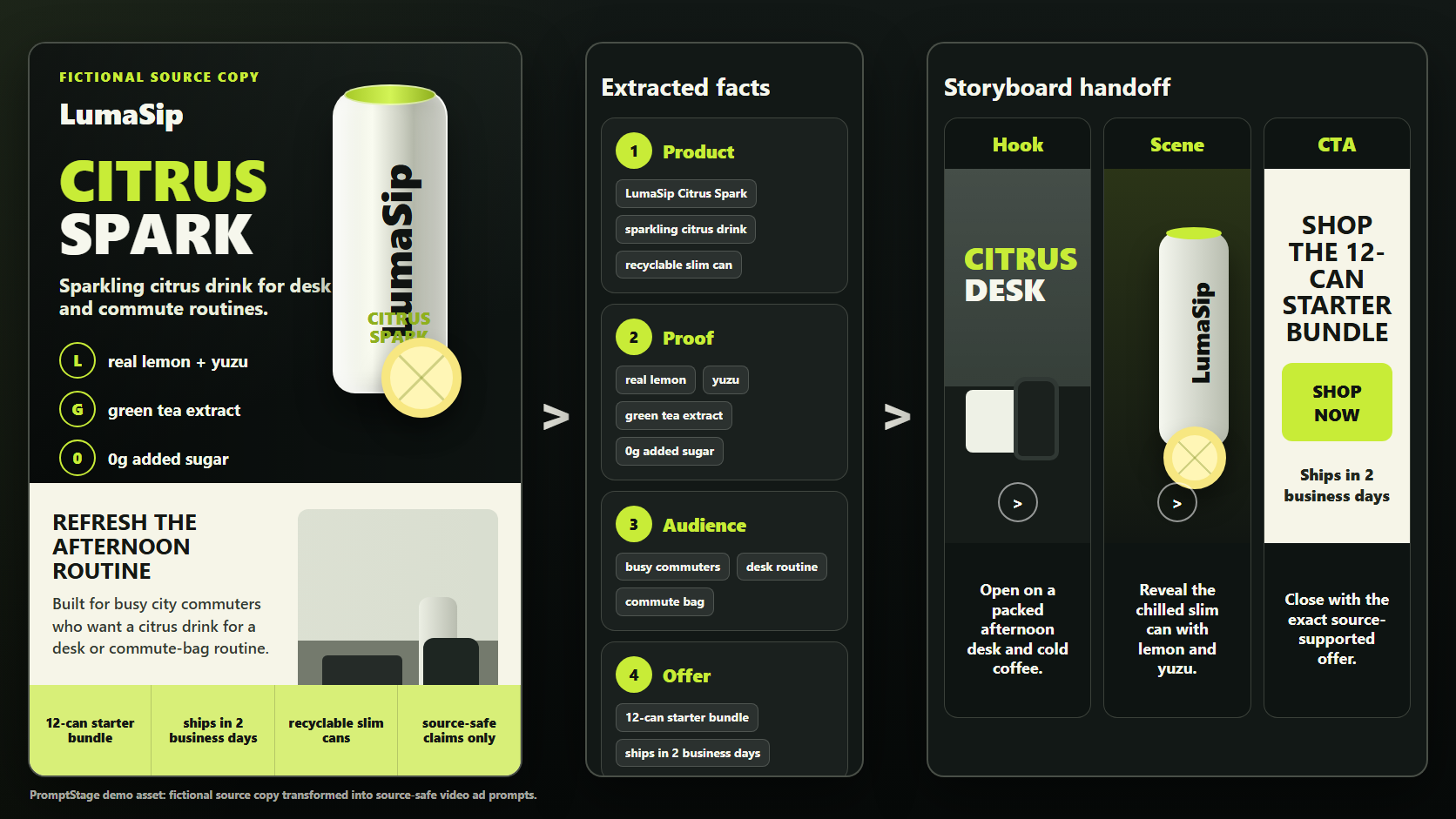
LumaSip product page to video ad handoff
Sparkling citrus drink for busy commuters. Real lemon, yuzu, green tea extract, 0g added sugar, recyclable slim cans, 12-can starter bundle, ships in 2 business days.
A sparkling citrus drink in recyclable slim cans. 12-can starter bundle that ships in 2 business days.
Your afternoon drink should fit the commute, not fight it.
Open on an afternoon desk and commute-bag moment, reveal condensation on the can, show the citrus proof details, then close on the starter bundle.
Keep source-supported claims, flag anything that needs verification, then check the prompt before spending video credits.
Create a 30s TikTok product-demo ad for busy commuters. Feature LumaSip Citrus Spark as a sparkling citrus drink in recyclable slim cans, show the citrus desk moment, include only source-supported proof details, and close on the 12-can starter bundle with the exact note ships in 2 business days.
Short answer
Use this tool when a product page is the source of truth for a short-form AI video ad. Paepae Stack extracts editable product facts, audience clues, offer details, proof points, brand notes, and visual context before generating hooks, scene prompts, camera notes, and a model-ready ad handoff.
Examples
The best source pages contain a product promise, audience clue, offer, proof point, and a visual cue. These examples show the shape Paepae Stack is trying to preserve before the prompt moves into an AI video model.
Ecommerce product demo
Sparkling citrus drink for busy commuters. Real lemon, yuzu, green tea extract, 0g added sugar, recyclable slim cans, 12-can starter bundle, ships in 2 business days.
A sparkling citrus drink in recyclable slim cans. 12-can starter bundle that ships in 2 business days.
Your afternoon drink should fit the commute, not fight it.
Open on an afternoon desk and commute-bag moment, reveal condensation on the can, show the citrus proof details, then close on the starter bundle.
Create a 30s TikTok product-demo ad for busy commuters. Feature LumaSip Citrus Spark as a sparkling citrus drink in recyclable slim cans, show the citrus desk moment, include only source-supported proof details, and close on the 12-can starter bundle with the exact note ships in 2 business days.
Desk setup accessory
Seven-port USB-C hub for hybrid workers. Dual 4K HDMI, SD card slot, 100W pass-through charging, aluminum body, works with MacBook and Windows laptops, 30-day returns.
A compact USB-C hub that turns one laptop port into a full desk setup. 30-day returns and a simple desk-upgrade purchase.
One laptop port should not decide how useful your desk is.
Start with tangled cables, plug in the hub, cut to dual monitors lighting up, then show the clean aluminum close-up.
Create a 15s Instagram Reels product-demo ad for hybrid workers. Show cable clutter becoming a clean dual-monitor laptop setup, feature the USB-C hub, and end on the 30-day return reassurance.
SaaS product walkthrough
AI meeting notes for small teams. Records action items, decisions, owners, and follow-ups. Works with Zoom and Google Meet. Free plan for 5 meetings per month.
An AI meeting notes app that turns calls into action items and decisions. Free plan for 5 meetings per month.
The meeting is not over until the next step is clear.
Show a messy call ending, cut to the notes app grouping decisions and owners, then close on the free-plan CTA.
Create a 30s YouTube Shorts SaaS demo ad for small teams. Show a meeting turning into owner-labeled action items, keep the interface readable, and make the free 5-meeting plan the closing CTA.
Premium product demo
Adjustable desk lamp with warm-to-cool light, glare control, weighted base, memory setting, and matte black finish. Built for late-night reading and focused work.
A premium adjustable desk lamp with warm-to-cool light and glare control. Upgrade the desk with one focused lighting tool.
Your desk light should help you focus, not fight your eyes.
Open on harsh overhead light, switch to the lamp glow, show warm-to-cool adjustment, then resolve on the matte product shot.
Create a 30s premium product ad for focused desk workers. Use controlled lighting, show glare control and color adjustment, preserve the matte black finish, and end with a calm desk payoff.
Workflow fit
Use this when the source of truth is a product page. Use HTML to Markdown for AI when you only need cleaned context, and use AI Video Ad Prompt Generator when the product facts are already clear.
Tool A cleans public pages into Markdown. Tool D turns commercial facts into ad prompts. This tool bridges the two steps for product pages.
The v1 extractor looks for the product description, audience, offer, proof points, brand notes, and visual context before generating ad scenes.
Audience and offer overrides let you correct the commercial angle before generating hooks, scene prompts, camera notes, and the handoff prompt.
| Page signal | Extracted fact | Ad prompt use |
|---|---|---|
| Product promise | What the product is and why a buyer should care. | Hook, product reveal, and final handoff prompt. |
| Audience clues | Who the page appears to be selling to. | Problem setup, talent direction, and on-screen context. |
| Offer and proof | Discounts, guarantees, benefits, reviews, or concrete differentiators. | Proof beat, CTA, and continuity notes. |
Good fit / not a good fit
The extractor is most useful when page facts need to be preserved before a short-form ad plan exists. If the page is thin or the campaign is already written, a different Paepae Stack tool is usually cleaner.
| Fit | Source shape | Best next step |
|---|---|---|
| Good fit | A public product page or pasted product-page copy contains the buyer promise, feature details, offer, and proof points. | Extract facts first, review them, then generate hooks and scene prompts. |
| Good fit | A marketing page has enough visual and brand context to guide a short-form product ad. | Use the extracted visual facts as continuity anchors for product shots. |
| Not a good fit | The page is private, blocked, client-rendered, or mostly navigation with very little product copy. | Paste the meaningful product copy manually or use the regular ad prompt generator. |
| Not a good fit | The campaign concept is already written and no page extraction is needed. | Use AI Video Ad Prompt Generator directly so you can focus on hook and scene structure. |
FAQ
No. It stages the product page into copy-ready prompt blocks before you spend credits in an AI video generator.
It fetches public HTML only. It does not bypass logins, paywalls, bot checks, private apps, or client-rendered product states.
Use the regular ad prompt generator when you already know the product facts and do not need Paepae Stack to extract them from a page.