Affiliate disclosure: Some recommended tool links may earn Paepae Stack a commission if you buy through them. Recommendations are based on fit, tradeoffs, evidence, and source notes. Read the disclosure.
BookReverb product media preview

Workflow evidence

What the BookReverb author workflow looks like

These three PaepaeStack owner-captured BookReverb screens show catalog, Amazon-identifier submission, queue, billing, funding, and top-off interface structure at capture time. They are workflow documentation only, not proof of campaign operation, review quality, policy compliance, payment activity, ranking, sales, or outcomes.

Catalog

Inspect the book and reader-control workspace

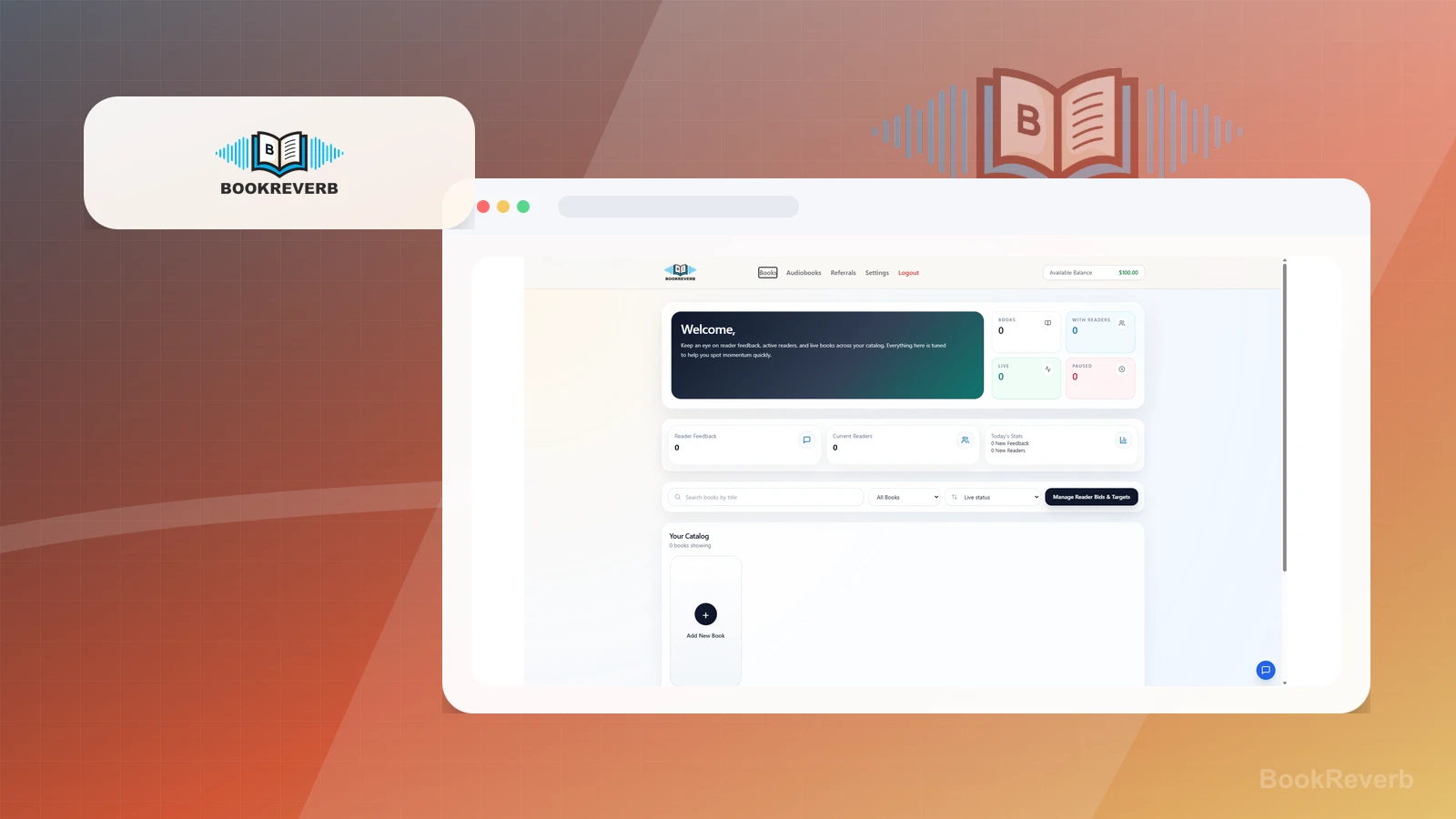
The captured dashboard presents book, reader, feedback, live and paused status, filters, and a Manage Reader Bids & Targets action in one interface.

Practical use

  • Identify the visible dashboard surfaces an operator would need to inspect
  • Separate captured counters and controls from policy, reader-quality, and campaign-monitoring work

What this screen does not prove: Visible counters, reader controls, statuses, and feedback surfaces do not prove a campaign ran, a reader participated, a review posted, or any outcome occurred.

BookReverb books dashboardOwner-captured BookReverb account interface at capture time.

Book submission

Locate Amazon identifier and queue fields

The Add Books screen shows a text area for Amazon ASINs or product URLs, duplicate guidance, a submit action, and queue language.

Practical use

  • Identify the visible identifier-entry and queue surfaces
  • Verify current requirements, rights, policy, eligibility, and processing behavior separately

What this screen does not prove: Visible ASIN, URL, duplicate, submit, and queue controls do not prove extraction, acceptance, setup, campaign activation, policy compliance, or any review outcome.

BookReverb add books screenOwner-captured BookReverb submission interface at capture time.

Billing

Review funding and top-off controls

The billing screen presents a balance, dated credit history, stored payment-method status, preset funding amounts, and auto top-off controls.

Practical use

  • Locate the visible balance, funding, and top-off settings
  • Define budgets, authorization, payment, monitoring, and stop rules outside the capture

What this screen does not prove: A visible balance, credit entry, payment-method status, funding control, or top-off setting does not prove payment processing, billing accuracy, campaign spending, compliance, or outcomes.

BookReverb billing and funding controlsOwner-captured BookReverb billing interface at capture time.

Plain verdict

Should you use BookReverb?

Example to explore cautiously after launch when the author needs reader feedback and review momentum, not guaranteed positive reviews or ranking outcomes.

Use this if

  • Post-launch review planning
  • Reader feedback workflows
  • KDP launch-support guardrails

Avoid for now if

  • Authors whose Amazon listing is not live, stable, and policy-ready yet
  • Anyone looking for guaranteed positive reviews, ratings, rankings, or sales
  • Campaigns that could pressure, incentivize, gate, or manipulate reader reviews

Evidence status

Limited hands-on evidence with workflow documentation

Last verified: 2026-06-25

Outbound status

Approved affiliate link

Affiliate links are disclosed before product clicks. Review the methodology.

Decision flow

Place BookReverb in the stack decision

Use this path before treating BookReverb as the answer. The product should fit the workflow role, comparison fork, and upgrade timing before an outbound click.

Short answer

BookReverb is an under-review candidate for post-launch review planning when that workflow is already the next bottleneck. Paepae Stack treats this page as documentation-based fit guidance, so it does not prove performance, conversion lift, deliverability, support quality, billing reliability, uptime, or long-term workflow results.

Quick take

A post-launch reader feedback and review-velocity platform for authors who already have a live Amazon book page and need careful compliance guardrails.

This is an example to explore while Paepae Stack reviews the workflow. Treat it as documentation-based fit guidance, not as proof of output quality, ad performance, support, billing, or long-term reliability.

Paepae Stack positions BookReverb as post-launch author review planning, reader-feedback workflow notes, and kdp launch-support guardrail content. The fit depends on the workflow, not only the feature list.

The recommendation includes workflow documentation and visible limitation notes, so the page separates what was seen in the workflow from claims that still require stronger proof.

Not ideal for

  • Authors whose Amazon listing is not live, stable, and policy-ready yet
  • Anyone looking for guaranteed positive reviews, ratings, rankings, or sales
  • Campaigns that could pressure, incentivize, gate, or manipulate reader reviews

Strengths

  • Clear fit after the book page is live and the author needs reader feedback momentum
  • Dashboard flow exposes book setup, reader bid/target management, referrals, and funding controls
  • Can be framed with explicit Amazon review-compliance and natural-pacing cautions

Cautions

  • Use only as reader exposure and review facilitation; do not require, buy, or imply positive reviews
  • Verify current BookReverb terms, Amazon review policies, campaign pacing, bid behavior, and author responsibilities before funding a campaign
  • Do not imply verified reviews, review count, ratings, ranking, ad performance, sales, or launch outcomes without evidence and policy review

What is still under review

This page is useful for workflow-fit research, but it is not a hands-on proof page yet. The captured interface documents visible controls, while completed owned setup evidence is still needed before making stronger claims.

  • Capture a representative setup path with screenshots or notes that support only the visible workflow claims.
  • Verify current plan limits, billing surfaces, export or migration controls, and cleanup path.
  • Keep performance, support, reliability, deliverability, conversion, or revenue claims out until owned evidence supports them.

Pricing snapshot

Funded reader-feedback and review-facilitation campaigns with account balance, reader bid/target controls, and optional auto top-off behavior visible in the dashboard.

Start by checking Amazon review-policy fit, BookReverb terms, the live Amazon listing, PDF readiness, starting bid, review goal, maximum budget, campaign pacing, and stop rules.

Plan caveats

  • Campaign spend should be capped before activation because higher bids and targets can change pickup speed and total budget exposure.
  • Review-adjacent workflows require conservative pacing and policy review; do not treat funding or bids as a way to buy positive reviews.

Pricing sources

Implementation notes

  • Start by deciding the job BookReverb must do in the stack, then compare it against the nearest alternatives.

When to upgrade

  • Upgrade toward BookReverb when the workflow it supports is already visible in the business.
  • Delay the purchase if the tool would create more setup work than customer-facing value this month.

Setup evidence

What the supplied BookReverb screenshots show

These screenshots show a Paepae-controlled BookReverb account dashboard, book-submission screen, and billing/funding surface. They support cautious workflow observations about account setup, Amazon URL/ASIN submission, reader bid/target management, and funding controls, but they do not prove review quality, review count, Amazon policy safety, ranking impact, ad performance, sales, or long-term reliability.

Evidence captured: 2026-06-25

What was checked

  • The dashboard summarizes books, active readers, live and paused books, current readers, reader feedback, and daily feedback/reader stats in one workspace.
  • The add-book screen accepts Amazon ASINs or Amazon product URLs and says submitted books move to a queue for scraping and setup.
  • The dashboard exposes a Manage Reader Bids & Targets action, which supports positioning BookReverb as a paid campaign-control workflow rather than a passive listing.
  • The billing screen shows account balance, manual funding history, stored payment-method status, preset funding amounts, and auto top-off settings.

What this does not prove

  • The screenshots do not show a live book campaign, an uploaded PDF, a completed queue run, or a submitted reader review.
  • The screenshots do not prove Amazon review-policy compliance for any specific campaign; policy review and natural pacing remain required.
  • The screenshots do not prove verified reviews, positive reviews, review count, reader quality, ranking improvement, sales, ad readiness, or launch performance.
  • The screenshots show account balance and payment-method status, but no card number, email address, API key, tracking URL, or other credential is visible.
Books dashboard and catalogThe dashboard makes the main author workflow visible: monitor books, readers, feedback, live/paused status, and reader bid/target controls from one screen.
Add books by Amazon URL or ASINThe add-book screen supports one-ASIN-or-URL-per-line submission and says BookReverb extracts ASINs, skips duplicates, and starts scraping for setup.
Billing and funding controlsThe billing screen shows that campaign spend is funded and controlled inside the account, so budget caps, bid pacing, and stop rules should be decided before activation.

Questions this page answers

Who is BookReverb a good fit for?
BookReverb is a good fit for post-launch review planning, reader feedback workflows, kdp launch-support guardrails when that workflow is already the next practical job in the business.
Who should skip BookReverb?
Skip or delay BookReverb if you identify with authors whose amazon listing is not live, stable, and policy-ready yet or if the tool would add setup work before creating customer-facing value.

Next best action

Decide whether BookReverb fits

The source and fit notes are inside the normal quarterly review window.

Visit BookReverb: Open the approved outbound path after checking the fit notes and plan caveats.

Use Stack Builder: Use the guided path if the right category or stack is still unclear.

Next steps

Compare or continue