Affiliate disclosure: Some recommended tool links may earn Paepae Stack a commission if you buy through them. Recommendations are based on fit, tradeoffs, evidence, and source notes. Read the disclosure.
ManuscriptReport product media preview

Workflow evidence

What the ManuscriptReport positioning workflow looks like

These three PaepaeStack owner-captured ManuscriptReport sample screens show keyword, genre, and trope sections for a public-domain sample title at capture time. They document visible report structure and labels only, not proof of upload or analysis completion, report accuracy, keyword relevance, genre or trope classification, comps, reader fit, metadata or category acceptance, ad targeting or performance, launch copy quality, originality, rights, rankings, discoverability, reader response, sales, or outcomes.

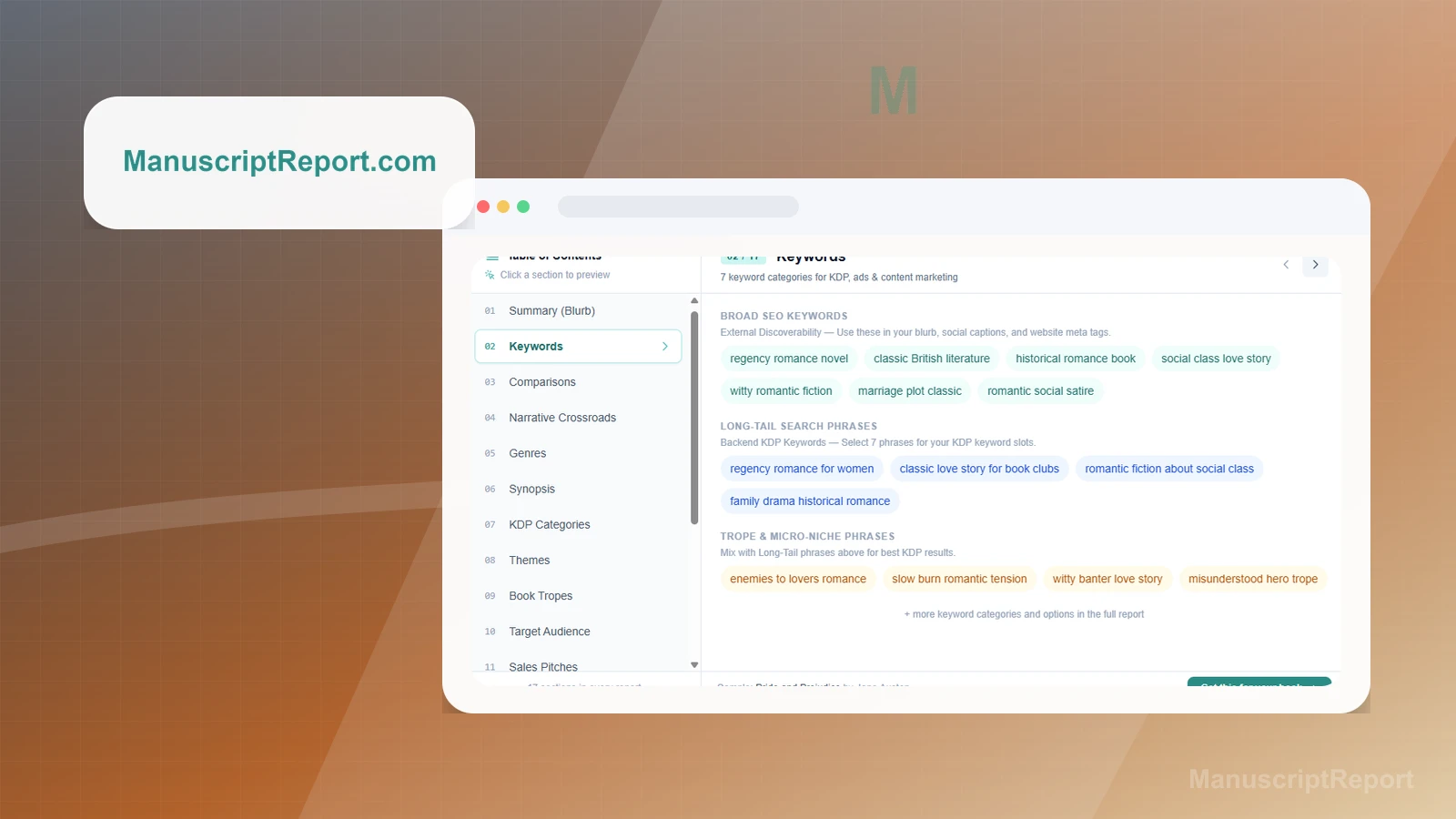
Keyword categories

Inspect keyword categories and phrase groupings

The Keywords section shows broad SEO keywords, long-tail phrases, trope and micro-niche phrase groupings, explanatory vendor text, table-of-contents navigation, a sample title, and a CTA.

Practical use

  • Map the visible keyword and phrase-grouping sections before defining a manuscript-specific metadata review.
  • Keep keyword relevance, search demand, rights, reader fit, and launch-copy review separate from the sample interface.

What this screen does not prove: Suggested phrases and vendor guidance do not prove manuscript analysis, keyword relevance, search demand, ad performance, metadata acceptance, discoverability, reader fit, rights clearance, or sales.

ManuscriptReport keyword categories and phrase groupingsOwner-captured ManuscriptReport keyword-section interface at capture time.

Genre breakdown

Review the captured genre breakdown

The Genres section shows three labeled genre percentages, a donut chart, a vendor-authored ad-targeting tip, table-of-contents navigation, a sample title, and a CTA.

Practical use

  • Identify the visible genre labels, chart, navigation, and targeting-tip location.
  • Validate classification, reader fit, ad targeting, metadata, category placement, and campaign performance independently.

What this screen does not prove: Genre labels, percentages, charts, and targeting tips do not prove classification accuracy, reader fit, ad targeting, campaign performance, metadata acceptance, category placement, discoverability, or sales.

ManuscriptReport captured genre breakdownOwner-captured ManuscriptReport genre-section interface at capture time.

Book tropes

Inspect the visible trope summaries

The Book Tropes section shows three trope headings and summaries about the sample, table-of-contents entries, a note about additional tropes, a sample title, and a CTA.

Practical use

  • Locate the visible trope headings, summaries, section navigation, and additional-tropes note.
  • Review analysis accuracy, originality, manuscript quality, reader response, trend relevance, and metadata use separately.

What this screen does not prove: Trope labels and summaries do not prove analysis accuracy, originality, manuscript quality, reader response, trend relevance, recommendation strength, TikTok performance, metadata acceptance, or sales.

ManuscriptReport visible trope summariesOwner-captured ManuscriptReport trope-section interface at capture time.

Plain verdict

Should you use ManuscriptReport?

Example to explore when an author needs clearer metadata, positioning, or market-language inputs before launch.

Use this if

  • Book positioning workflows
  • Author metadata planning
  • Launch copy inputs

Avoid for now if

  • Authors expecting software to replace editorial judgment or market testing
  • Books without a clear genre, reader promise, or manuscript direction
  • Anyone expecting guaranteed sales, ad results, or bestseller outcomes

Evidence status

Documentation-based with workflow documentation

Last verified: 2026-06-02

Outbound status

Approved affiliate link

Affiliate links are disclosed before product clicks. Review the methodology.

Decision flow

Place ManuscriptReport in the stack decision

Use this path before treating ManuscriptReport as the answer. The product should fit the workflow role, comparison fork, and upgrade timing before an outbound click.

Short answer

ManuscriptReport is an under-review candidate for book positioning workflows when that workflow is already the next bottleneck. Paepae Stack treats this page as documentation-based fit guidance, so it does not prove performance, conversion lift, deliverability, support quality, billing reliability, uptime, or long-term workflow results.

Quick take

A book-positioning and marketing-support tool for blurbs, comps, keywords, genres, tropes, and launch-adjacent copy.

This is an example to explore while Paepae Stack reviews the workflow. Treat it as documentation-based fit guidance, not as proof of output quality, ad performance, support, billing, or long-term reliability.

Paepae Stack positions ManuscriptReport as author positioning notes, book metadata workflow planning, and future launch-copy comparisons. The fit depends on the workflow, not only the feature list.

The recommendation includes workflow documentation and visible limitation notes, so the page separates what was seen in the workflow from claims that still require stronger proof.

Not ideal for

  • Authors expecting software to replace editorial judgment or market testing
  • Books without a clear genre, reader promise, or manuscript direction
  • Anyone expecting guaranteed sales, ad results, or bestseller outcomes

Strengths

  • Focused on book metadata and positioning inputs
  • Useful after a manuscript exists but before launch language is finalized
  • Can complement research tools without replacing author judgment

Cautions

  • Keep claims under review until owned report output, data sources, and launch-copy usefulness are checked
  • Verify current pricing, export behavior, genre coverage, and copy rights before recommending broadly
  • Do not imply sales, ad performance, ranking, or reader-response outcomes without evidence

What is still under review

This page is useful for workflow-fit research, but it is not a hands-on proof page yet. The captured interface documents visible controls, while completed owned setup evidence is still needed before making stronger claims.

  • Capture a representative setup path with screenshots or notes that support only the visible workflow claims.
  • Verify current plan limits, billing surfaces, export or migration controls, and cleanup path.
  • Keep performance, support, reliability, deliverability, conversion, or revenue claims out until owned evidence supports them.

Pricing snapshot

Book positioning and metadata-support pricing should be checked from the current product site before relying on exact terms.

Start by checking the expected report output, genre coverage, keyword or comp handling, copy rights, exports, and where the author will use the output.

Plan caveats

  • Positioning and metadata tools do not replace editorial judgment, reader testing, or market validation.
  • Genre coverage, data freshness, output rights, export behavior, and use-case fit should be checked before recommendation.

Pricing sources

Implementation notes

  • Start by deciding the job ManuscriptReport must do in the stack, then compare it against the nearest alternatives.

When to upgrade

  • Upgrade toward ManuscriptReport when the workflow it supports is already visible in the business.
  • Delay the purchase if the tool would create more setup work than customer-facing value this month.

Questions this page answers

Who is ManuscriptReport a good fit for?
ManuscriptReport is a good fit for book positioning workflows, author metadata planning, launch copy inputs when that workflow is already the next practical job in the business.
Who should skip ManuscriptReport?
Skip or delay ManuscriptReport if you identify with authors expecting software to replace editorial judgment or market testing or if the tool would add setup work before creating customer-facing value.

Next best action

Decide whether ManuscriptReport fits

The page is past the quarterly review window and should be refreshed before heavier promotion.

Visit ManuscriptReport: Open the approved outbound path after checking the fit notes and plan caveats.

Use Stack Builder: Use the guided path if the right category or stack is still unclear.

Guides

Read before choosing ManuscriptReport

Next steps

Compare or continue