Affiliate disclosure: Some recommended tool links may earn Paepae Stack a commission if you buy through them. Recommendations are based on fit, tradeoffs, evidence, and source notes. Read the disclosure.
ClickFunnels product media preview
Funnel workspaceMap the funnel workspace

Start with the app and funnel surfaces before deciding whether a sales-first platform is the right stack layer.

Workflow evidence

What the ClickFunnels funnel-planning workflow looks like

These ClickFunnels-hosted public product screens show the app catalog, funnel templates, a two-step funnel map, and landing-page starting points. They support workflow-fit notes, not claims about hands-on account testing, conversion lift, revenue, checkout reliability, email performance, support quality, or future campaign results.

App surface

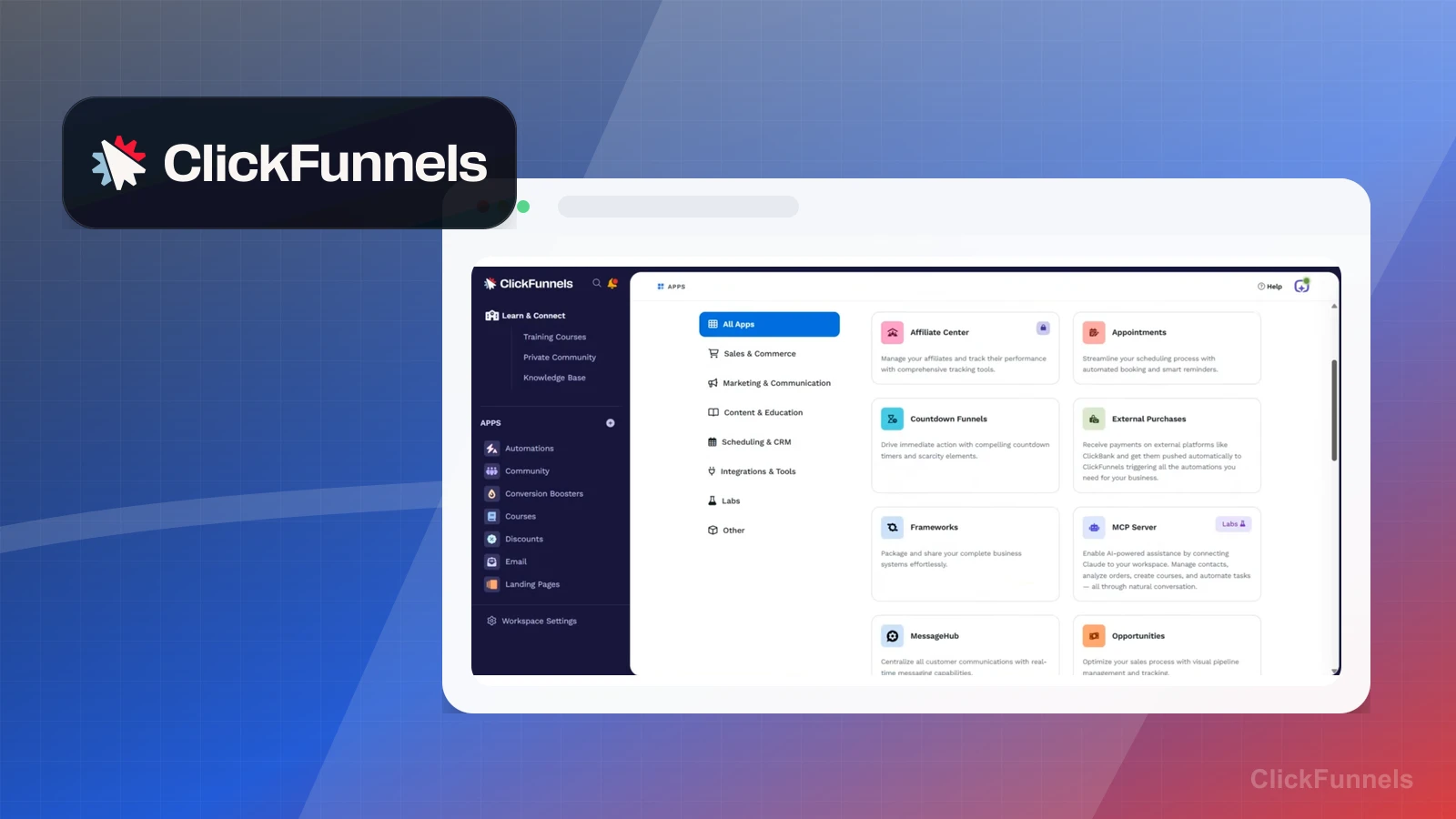
Start with the actual workspace scope

The app surface shows a broad funnel-building workspace with multiple marketing jobs available before the page-building step.

Practical use

  • Decide whether the business really needs a funnel workspace or only a simpler page and email path.
  • Use the app surface to identify which parts need an owner before a campaign goes live.

What this screen does not prove: A broad app workspace does not prove that every team needs the complexity or that a funnel will convert once built.

ClickFunnels app workspaceThe workspace scope helps decide whether ClickFunnels is the right layer or too much for the current launch.

Additional apps

Check the surrounding marketing surfaces

The additional app view shows how ClickFunnels can extend beyond one landing page into a broader campaign workspace.

Practical use

  • Identify which surfaces are actually needed for the offer and which would distract a small team.
  • Compare the platform scope against lighter alternatives before paying for a funnel-first system.

What this screen does not prove: More app surfaces do not prove better execution, lower cost, faster launch, or stronger campaign results.

ClickFunnels additional app surfacesExtra surfaces are useful only when the campaign has a clear owner and operating plan.

Funnel templates

Choose funnel templates by campaign job

The funnel template screen shows starting points for different campaign jobs before a marketer writes copy or configures the offer.

Practical use

  • Match templates to the specific job: lead capture, sales page, webinar, order flow, or another campaign step.
  • Keep template selection separate from the harder work of offer clarity, copy, traffic, and follow-up.

What this screen does not prove: Template availability does not prove conversion rate, message fit, traffic quality, checkout completion, or launch readiness.

ClickFunnels funnel templatesTemplates can speed setup, but the offer and traffic plan still decide whether the funnel has a chance.

Workflow planning

Map the funnel steps before building pages

The workflow screen shows the need to think in steps instead of treating one landing page as the whole sales system.

Practical use

  • List the entry point, page sequence, checkout or booking handoff, follow-up, and failure path before publishing.
  • Use the workflow view to decide whether the funnel is maintainable for the current team.

What this screen does not prove: A workflow diagram does not prove that the sequence is strategically sound, profitable, or reliable in production.

ClickFunnels workflow planning surfaceWorkflow planning helps prevent a page-builder decision from becoming an unowned campaign system.

Landing-page templates

Inspect landing-page starting points before committing

The landing-page template view shows page examples a creator can inspect before choosing a design direction.

Practical use

  • Choose templates around offer clarity, proof, call to action, and traffic source rather than visual polish alone.
  • Use the examples to compare ClickFunnels against a lighter website, checkout, or email-capture stack.

What this screen does not prove: Landing-page examples do not prove copy quality, accessibility, conversion lift, checkout reliability, or customer trust.

ClickFunnels landing-page templatesLanding-page examples are starting points, not evidence that a funnel is ready to receive traffic.

Plain verdict

Should you use ClickFunnels?

Good fit for funnel-heavy creators and marketers who want a sales-first platform.

Use this if

  • Funnel-first marketers
  • Offer testing
  • Sales-page workflows

Avoid for now if

  • Creators who only need email
  • WordPress-first editorial businesses
  • People avoiding funnel complexity

Evidence status

Documentation-based with workflow documentation

Last verified: 2026-05-02

Outbound status

Approved affiliate link

Affiliate links are disclosed before product clicks. Review the methodology.

Decision flow

Place ClickFunnels in the stack decision

Use this path before treating ClickFunnels as the answer. The product should fit the workflow role, comparison fork, and upgrade timing before an outbound click.

Short answer

ClickFunnels fits when funnel-first marketers need the stack role it is built for. It is not the right first path if your workflow matches creators who only need email, so compare the cautions and alternatives before treating it as the first purchase.

Quick take

A funnel builder for sales pages, offers, campaigns, and conversion-focused marketing workflows.

Paepae Stack positions ClickFunnels as funnel-heavy creator stack, marketer stack, and funnel-builder comparisons. The fit depends on the workflow, not only the feature list.

The recommendation includes workflow documentation and visible limitation notes, so the page separates what was seen in the workflow from claims that still require stronger proof.

Not ideal for

  • Creators who only need email
  • WordPress-first editorial businesses
  • People avoiding funnel complexity

Strengths

  • Clear funnel category association
  • High-intent comparison traffic
  • Useful alternative to Systeme.io and HighLevel

Cautions

  • Competitive content space
  • Should be recommended by use case, not hype

Pricing snapshot

Funnel-building plans oriented around sales pages, funnels, offers, and campaign workflows.

Start by checking funnel, page, contact, workspace, checkout, and campaign needs.

Plan caveats

  • Funnel software is only worth the cost if the offer and traffic plan are clear.
  • Check current plan limits before assuming email, checkout, or funnel capacity is enough.

Pricing sources

Implementation notes

  • Start by deciding the job ClickFunnels must do in the stack, then compare it against the nearest alternatives.
  • Keep the first launch path simple, but document which parts of the workflow would be hard to migrate later.
  • Write down the trigger, fields, and expected result before building an automation around it.

When to upgrade

  • Upgrade toward ClickFunnels when the workflow it supports is already visible in the business.
  • Delay the purchase if the tool would create more setup work than customer-facing value this month.

Questions this page answers

Who is ClickFunnels a good fit for?
ClickFunnels is a good fit for funnel-first marketers, offer testing, sales-page workflows when that workflow is already the next practical job in the business.
Who should skip ClickFunnels?
Skip or delay ClickFunnels if you identify with creators who only need email or if the tool would add setup work before creating customer-facing value.

Next best action

Decide whether ClickFunnels fits

The page is past the quarterly review window and should be refreshed before heavier promotion.

Visit ClickFunnels: Open the approved outbound path after checking the fit notes and plan caveats.

Compare ClickFunnels: Use the closest comparison when the product still feels close to another option.

Use Stack Builder: Use the guided path if the right category or stack is still unclear.

Guides

Read before choosing ClickFunnels

Next steps

Compare or continue