Affiliate disclosure: Some recommended tool links may earn Paepae Stack a commission if you buy through them. Recommendations are based on fit, tradeoffs, evidence, and source notes. Read the disclosure.
Systeme.io product media preview

Workflow evidence

What the Systeme.io workflow looks like

These six PaepaeStack owner-captured Systeme.io screens document funnel, automation, blog, newsletter, course-page, and creator-store interfaces at capture time. They support careful workflow inspection, not claims about deliverability, conversion, sales, payments, course delivery, uptime, or reliability.

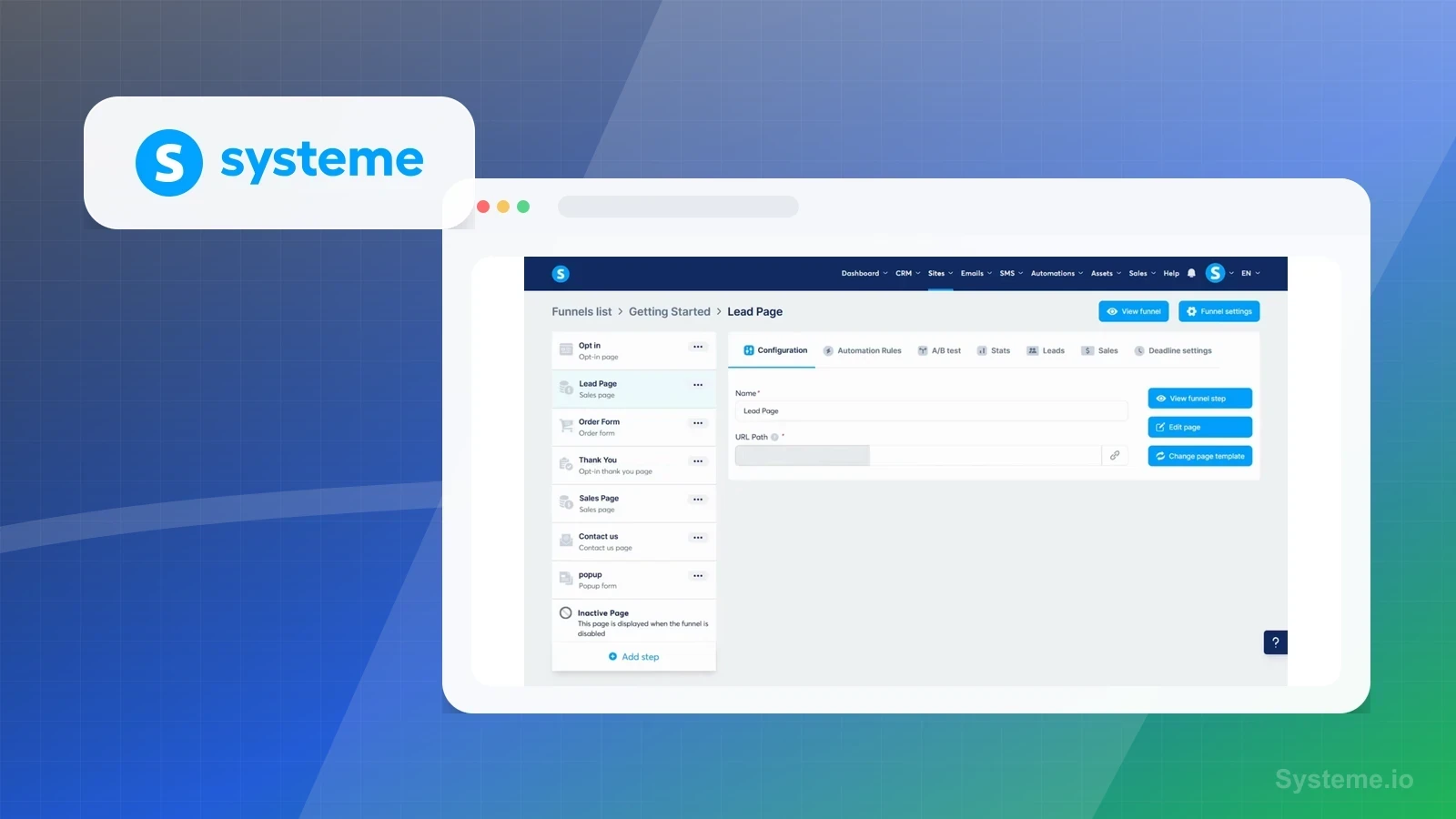
Funnels

Map the funnel-step workspace

The funnel workspace shows step navigation, page editing, and campaign structure in the visible account interface.

Practical use

  • List the pages, ownership, offer, consent, analytics, and handoff decisions before building a launch path.
  • Separate visible funnel controls from copy review, form testing, publishing, and measurement requirements.

What this screen does not prove: A visible funnel workspace does not prove that a funnel was published, received traffic, captured leads, or converted visitors.

Systeme.io funnel workspaceOwner-captured Systeme.io screen documenting the funnel workspace at capture time.

Automation

Inspect the automation path

The automation screen shows trigger and action structure for a visible follow-up path.

Practical use

  • Map triggers, actions, exclusions, consent, testing, monitoring, and stop conditions before activation.
  • Treat the visible sequence as a planning reference while verifying live delivery separately.

What this screen does not prove: An automation screen does not prove that a trigger fired, a message was sent, a subscriber received it, or a workflow performed reliably.

Systeme.io automation workflowOwner-captured Systeme.io screen documenting automation structure at capture time.

Blog editor

Review the blog-page editor

The editor shows page content and publishing controls for a blog-oriented surface.

Practical use

  • Plan content ownership, metadata, accessibility, links, review, publishing, and measurement before release.
  • Use the visible editor to identify which content checks remain outside the tool interface.

What this screen does not prove: An editor view does not prove that content is accurate, accessible, indexed, published, discoverable, or effective.

Systeme.io blog-page editorOwner-captured Systeme.io screen documenting the blog-page editing surface at capture time.

Newsletters

Inspect newsletter composition controls

The newsletter editor shows composition, formatting, and message-management controls in the captured interface.

Practical use

  • Define audience, sender, consent, content review, links, test-send, and approval steps before scheduling a broadcast.
  • Separate editor availability from deliverability, inbox placement, and engagement measurement.

What this screen does not prove: A newsletter editor does not prove that a message was approved, scheduled, sent, delivered, opened, clicked, or effective.

Systeme.io newsletter editorOwner-captured Systeme.io screen documenting newsletter composition controls at capture time.

Courses

Review course-page template controls

The course-page editor shows template and content configuration surfaces for a learning product.

Practical use

  • Plan lesson ownership, access rules, learner support, accessibility, publishing, and testing before enrollment opens.
  • Use the visible template controls to identify decisions that still need a complete learner-path check.

What this screen does not prove: A course-page editor does not prove student enrollment, access control, lesson delivery, completion, payment, or learning outcomes.

Systeme.io course-page editorOwner-captured Systeme.io screen documenting course-page template controls at capture time.

Creator stores

Inspect creator-store product choices

The creator-store setup screen shows visible product-type choices before a storefront is configured.

Practical use

  • Choose the product model, owner, offer details, fulfillment path, policy checks, and support path before publication.
  • Separate a visible store setup choice from live checkout and customer-delivery validation.

What this screen does not prove: Product-type choices do not prove storefront publication, product availability, payment processing, order fulfillment, revenue, or customer support.

Systeme.io creator-store setupOwner-captured Systeme.io screen documenting creator-store product choices at capture time.

Plain verdict

Should you use Systeme?

Good fit for beginner creators who want one simple platform before assembling a larger stack.

Use this if

  • Beginner creators
  • Digital product sellers
  • Budget-conscious funnels

Avoid for now if

  • Agencies needing client subaccounts
  • Teams committed to WordPress
  • Complex CRM workflows

Evidence status

Limited hands-on evidence with workflow documentation

Last verified: 2026-05-07

Outbound status

Approved affiliate link

Affiliate links are disclosed before product clicks. Review the methodology.

Decision flow

Place Systeme in the stack decision

Use this path before treating Systeme as the answer. The product should fit the workflow role, comparison fork, and upgrade timing before an outbound click.

Short answer

Systeme.io is a practical fit for beginner creators who want landing pages, email, funnels, automation, and simple selling in one lower-complexity account. Paepae Stack's limited setup pass found visible support for funnel steps, an opt-in field, SEO settings, an automation rule, product fields, stats, and plan-limit friction, but not proof of deliverability, payment reliability, conversion rate, or long-term course delivery.

Quick take

An all-in-one platform for landing pages, email, funnels, automations, and simple digital product sales.

Paepae Stack positions Systeme.io as beginner creator stack, budget stack, and all-in-one platform comparisons. The fit depends on the workflow, not only the feature list.

The recommendation includes workflow documentation and visible limitation notes, so the page separates what was seen in the workflow from claims that still require stronger proof.

Not ideal for

  • Agencies needing client subaccounts
  • Teams committed to WordPress
  • Complex CRM workflows

Strengths

  • Broad feature set
  • Simple stack for launch
  • Covers core launch jobs in one account

Cautions

  • All-in-one convenience can become limiting
  • Advanced teams may outgrow the CRM depth

Pricing snapshot

Free and paid all-in-one platform plans with monthly and annual billing options.

Start by checking contact, funnel, email, automation, custom-domain, and course limits.

Plan caveats

  • The lowest-friction plan is not always the right plan if funnels, automations, or course limits are close to the cap.
  • Migration and sub-account behavior should be checked on the current pricing page before making a long-term decision.

Pricing sources

Implementation notes

  • Start by deciding the job Systeme must do in the stack, then compare it against the nearest alternatives.
  • Set up one signup form, one welcome email, and one regular sending habit before adding advanced segments.
  • Keep the first launch path simple, but document which parts of the workflow would be hard to migrate later.
  • Write down the trigger, fields, and expected result before building an automation around it.

When to upgrade

  • Upgrade toward Systeme when the workflow it supports is already visible in the business.
  • Delay the purchase if the tool would create more setup work than customer-facing value this month.

Questions this page answers

What did Paepae Stack personally test?
Paepae Stack used a controlled account to inspect dashboard setup, funnel creation, opt-in page editing, a published opt-in preview, SEO settings, a completed automation rule, product fields, funnel stats, and visible plan-limit friction.
Is Systeme.io worth using on the free plan?
The free plan can be useful for testing a simple launch path, but the screenshots show real plan limits. Check funnel, automation, email, custom-domain, course, and checkout requirements before assuming the free plan covers the whole launch.

Next best action

Decide whether Systeme fits

The page is past the quarterly review window and should be refreshed before heavier promotion.

Visit Systeme: Open the approved outbound path after checking the fit notes and plan caveats.

Compare Systeme: Use the closest comparison when the product still feels close to another option.

Use Stack Builder: Use the guided path if the right category or stack is still unclear.

Guides

Read before choosing Systeme

Next steps

Compare or continue

HighLevel / GoHighLevel

Good fit for micro-agencies and consultants who need client-focused CRM, funnels, and automations.

ClickFunnels

Good fit for funnel-heavy creators and marketers who want a sales-first platform.

MailerLite

Good fit for newsletter-led creators who want dedicated email capture and publishing before buying a full funnel or CRM suite.

Systeme.io vs HighLevel

Choose Systeme.io for a simple creator launch. Choose HighLevel when client pipelines, agency workflows, and CRM depth matter.

Systeme.io vs ClickFunnels

Choose Systeme.io for an affordable all-in-one creator stack. Choose ClickFunnels when funnel testing and sales-page workflows are central.

Beginner Creator Stack

Start with the fewest moving pieces. An all-in-one platform can cover pages, email, funnels, and simple selling while the offer is still being validated.

Coach and Consultant Stack

The stack should capture leads, explain the offer, support follow-up, and deliver paid education or services without creating avoidable admin work.

Course Creator Stack

Put course delivery at the center, then add email and automation around launch, onboarding, and student communication.

Creator Email Marketing

A focused hub for creators choosing newsletter tools, signup forms, welcome sequences, and email-first workflows.

Course Selling Stack

A course-selling hub for creators comparing course platforms, email follow-up, and simple launch stacks.

Digital Product Selling

A digital-product hub for selling templates, downloads, simple offers, courses, and starter funnels.