Affiliate disclosure: Some recommended tool links may earn Paepae Stack a commission if you buy through them. Recommendations are based on fit, tradeoffs, evidence, and source notes. Read the disclosure.
Creative Fabrica product media preview

Workflow evidence

What the Creative Fabrica Studio AI workflow looks like

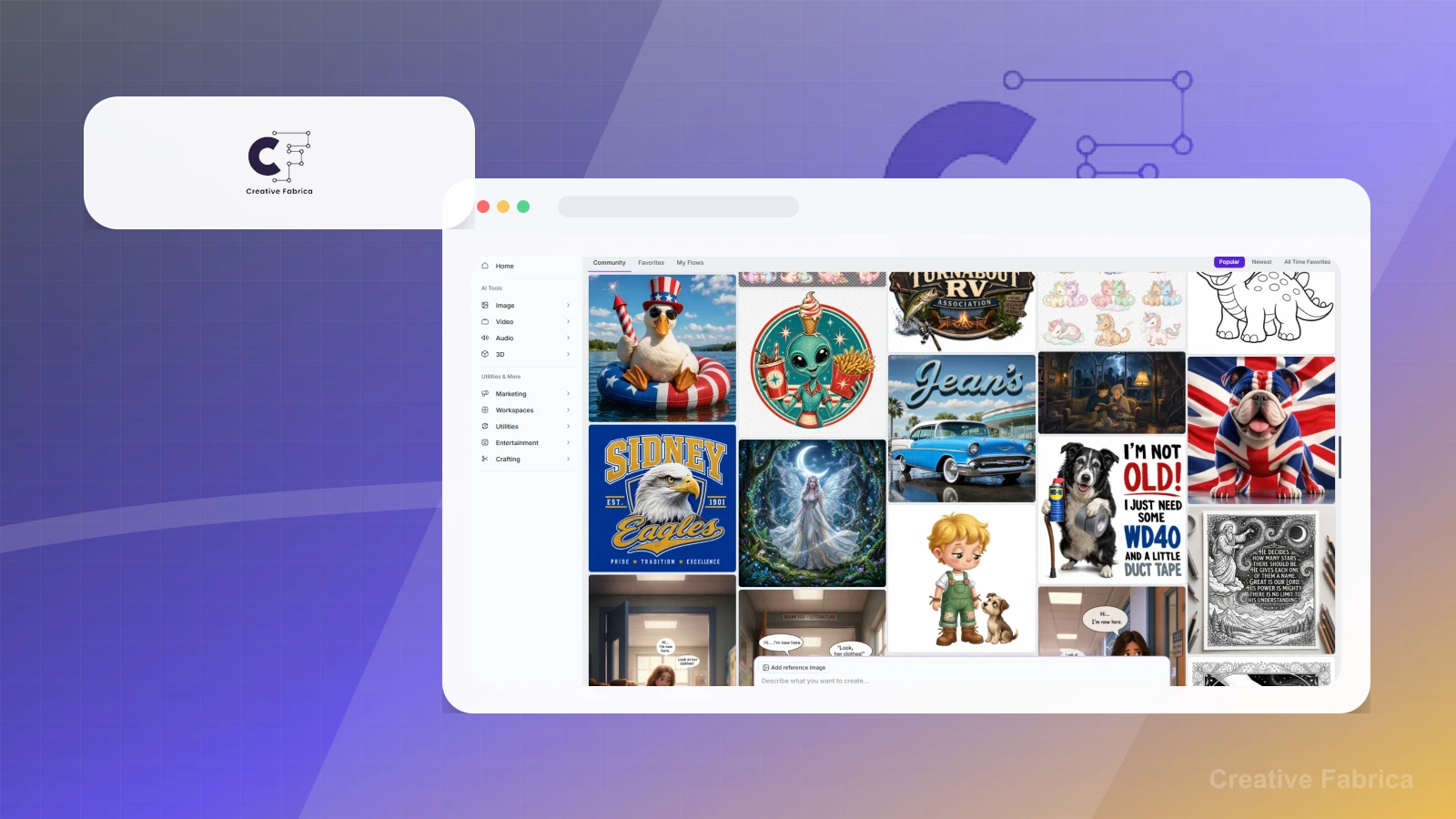
These three PaepaeStack owner-captured Creative Fabrica Studio AI screens show image, music, and video community or generation interface structure at capture time. They are documentation evidence only, not proof of authorship, rights, licensing, generation success, output quality, publication, or sales.

Image community and prompt surface

Inspect the image community and prompt controls

The capture shows Studio AI navigation, image, video, audio, and 3D categories, community and favorites tabs, public example images, a prompt field, reference-image control, model and aspect controls, public visibility, and an online count.

Practical use

  • Identify the visible image-community and prompt-control surfaces.
  • Separate public examples and capture-time controls from rights, consent, model, generation, and commercial-use checks.

What this screen does not prove: Public examples, creator handles, counters, model labels, online counts, and promotional text do not prove authorship, originality, rights, consent, current availability or pricing, generation success, output quality, commercial use, KDP acceptance, or sales.

Creative Fabrica image community and prompt surfaceOwner-captured Creative Fabrica image interface at capture time.

Music-generation setup

Review visible song-generation inputs

The capture shows a model selector, description field, optional lyrics, duration and mode controls, reference controls, public visibility, and community music cards with visible engagement counters.

Practical use

  • Locate the visible song-generation input and community surfaces.
  • Review ownership, licensing, originality, audio, export, and publication questions independently.

What this screen does not prove: Visible tracks, handles, counters, labels, and controls do not prove ownership, licensing, originality, consent, generation, audio quality, export, publication, commercial rights, or suitability.

Creative Fabrica music-generation inputsOwner-captured Creative Fabrica music-generation interface at capture time.

Video-generation controls

Locate video-generation and template controls

The capture shows community, favorites, and template tabs, public example videos, a prompt surface, image input, template and director controls, model, aspect ratio, resolution, duration, and public visibility controls.

Practical use

  • Map the visible video-generation and template-control surfaces.
  • Keep rights, consent, output, export, publication, and advertising review outside the capture.

What this screen does not prove: Example scenes, people, promotional artwork, model labels, and controls do not prove rights, consent, generation, output quality, export, publication, ad acceptance, performance, or current plan access.

Creative Fabrica video-generation controlsOwner-captured Creative Fabrica video interface at capture time.

Plain verdict

Should you use Creative Fabrica?

Example to explore only with licensing, copyright, trademark, and KDP-policy guardrails in place.

Use this if

  • KDP asset sourcing
  • Creator design assets
  • Low-content workflow research

Avoid for now if

  • Authors who have not checked license rights for the exact use case
  • Trademark-sensitive or copyright-sensitive publishing workflows without review
  • Creators expecting asset marketplaces to guarantee originality, KDP acceptance, or sales

Evidence status

Documentation-based with workflow documentation

Last verified: 2026-06-08

Outbound status

Approved affiliate link

Affiliate links are disclosed before product clicks. Review the methodology.

Decision flow

Place Creative Fabrica in the stack decision

Use this path before treating Creative Fabrica as the answer. The product should fit the workflow role, comparison fork, and upgrade timing before an outbound click.

Short answer

Creative Fabrica is an under-review candidate for kdp asset sourcing when that workflow is already the next bottleneck. Paepae Stack treats this page as documentation-based fit guidance, so it does not prove performance, conversion lift, deliverability, support quality, billing reliability, uptime, or long-term workflow results.

Quick take

A creative asset marketplace for fonts, graphics, KDP interiors, low-content assets, and creator design resources.

This is an example to explore while Paepae Stack reviews the workflow. Treat it as documentation-based fit guidance, not as proof of output quality, ad performance, support, billing, or long-term reliability.

Paepae Stack positions Creative Fabrica as kdp asset workflow notes, creator-resource planning, and licensing-aware publishing guidance. The fit depends on the workflow, not only the feature list.

The recommendation includes workflow documentation and visible limitation notes, so the page separates what was seen in the workflow from claims that still require stronger proof.

Not ideal for

  • Authors who have not checked license rights for the exact use case
  • Trademark-sensitive or copyright-sensitive publishing workflows without review
  • Creators expecting asset marketplaces to guarantee originality, KDP acceptance, or sales

Strengths

  • Broad creative asset and template inventory
  • Useful for KDP-adjacent design and low-content workflows when licensing is checked
  • Can support creator-resource planning without becoming the launch strategy itself

Cautions

  • Keep claims under review until licensing, copyright, trademark, AI asset, and KDP-policy guardrails are documented
  • Verify current subscription terms, license scope, commercial use, download records, and attribution requirements
  • Do not imply copyright safety, trademark clearance, KDP compliance, originality, or sales outcomes without review

What is still under review

This page is useful for workflow-fit research, but it is not a hands-on proof page yet. The captured interface documents visible controls, while completed owned setup evidence is still needed before making stronger claims.

  • Capture a representative setup path with screenshots or notes that support only the visible workflow claims.
  • Verify current plan limits, billing surfaces, export or migration controls, and cleanup path.
  • Keep performance, support, reliability, deliverability, conversion, or revenue claims out until owned evidence supports them.

Pricing snapshot

Creative asset marketplace and subscription terms should be checked against current license, download, commercial-use, and subscription rules.

Start by checking license scope, commercial use, fonts, graphics, AI assets, KDP interiors, attribution, download records, and cancellation terms.

Plan caveats

  • Asset marketplaces require copyright, trademark, license, and KDP-policy review before use in public publishing workflows.
  • Subscription access does not automatically prove originality, commercial-use safety, or platform compliance for every asset.

Pricing sources

Implementation notes

  • Start by deciding the job Creative Fabrica must do in the stack, then compare it against the nearest alternatives.

When to upgrade

  • Upgrade toward Creative Fabrica when the workflow it supports is already visible in the business.
  • Delay the purchase if the tool would create more setup work than customer-facing value this month.

Questions this page answers

Who is Creative Fabrica a good fit for?
Creative Fabrica is a good fit for kdp asset sourcing, creator design assets, low-content workflow research when that workflow is already the next practical job in the business.
Who should skip Creative Fabrica?
Skip or delay Creative Fabrica if you identify with authors who have not checked license rights for the exact use case or if the tool would add setup work before creating customer-facing value.

Next best action

Decide whether Creative Fabrica fits

The page is past the quarterly review window and should be refreshed before heavier promotion.

Visit Creative Fabrica: Open the approved outbound path after checking the fit notes and plan caveats.

Use Stack Builder: Use the guided path if the right category or stack is still unclear.

Next steps

Compare or continue