Affiliate disclosure: Some recommended tool links may earn Paepae Stack a commission if you buy through them. Recommendations are based on fit, tradeoffs, evidence, and source notes. Read the disclosure.
Pabbly product media preview
API actionInspect the API action

Review the visible action controls before deciding whether a custom API step belongs in the workflow.

Workflow evidence

What the Pabbly automation-planning workflow looks like

These repository-held screens were recorded in authenticated historical source as Pabbly-provided public product screens. They show the app suite, an empty dashboard, workflow setup, empty task history, and API or webhook controls. They support workflow-fit notes, not claims about hands-on account testing, successful automation, data movement, billing, reliability, support, or future time savings.

Product suite

Check which Pabbly surface fits the job

The All Pabbly Apps screen shows separate cards for Connect, Subscription Billing, Email Marketing, Form Builder, and Email Verification.

Practical use

  • Name the actual job before choosing between an automation connector and another Pabbly product surface.
  • Keep product selection separate from later connector, field, pricing, and ownership checks.

What this screen does not prove: Visible product cards and offer amounts do not prove current pricing, plan availability, integration fit, payment results, email results, or business value.

Pabbly apps screenThe app cards separate several Pabbly product surfaces before a team chooses an automation path.

Dashboard

Review the empty workflow starting state

The dashboard shows task-allocation summaries, empty Home and Trash folders, a No workflows found state, and Create Workflow controls.

Practical use

  • Locate where workflows and folders would be reviewed before assigning an operating owner.
  • Use the empty state to identify the first setup action without treating example task counts as a plan entitlement.

What this screen does not prove: Generic task counts and an empty dashboard do not prove plan limits, automation health, alerting quality, task execution, or future usage.

Pabbly Connect dashboard empty stateThe empty dashboard shows workflow entry points and task-summary locations without showing a completed automation.

Workflow setup

Choose the trigger before the action

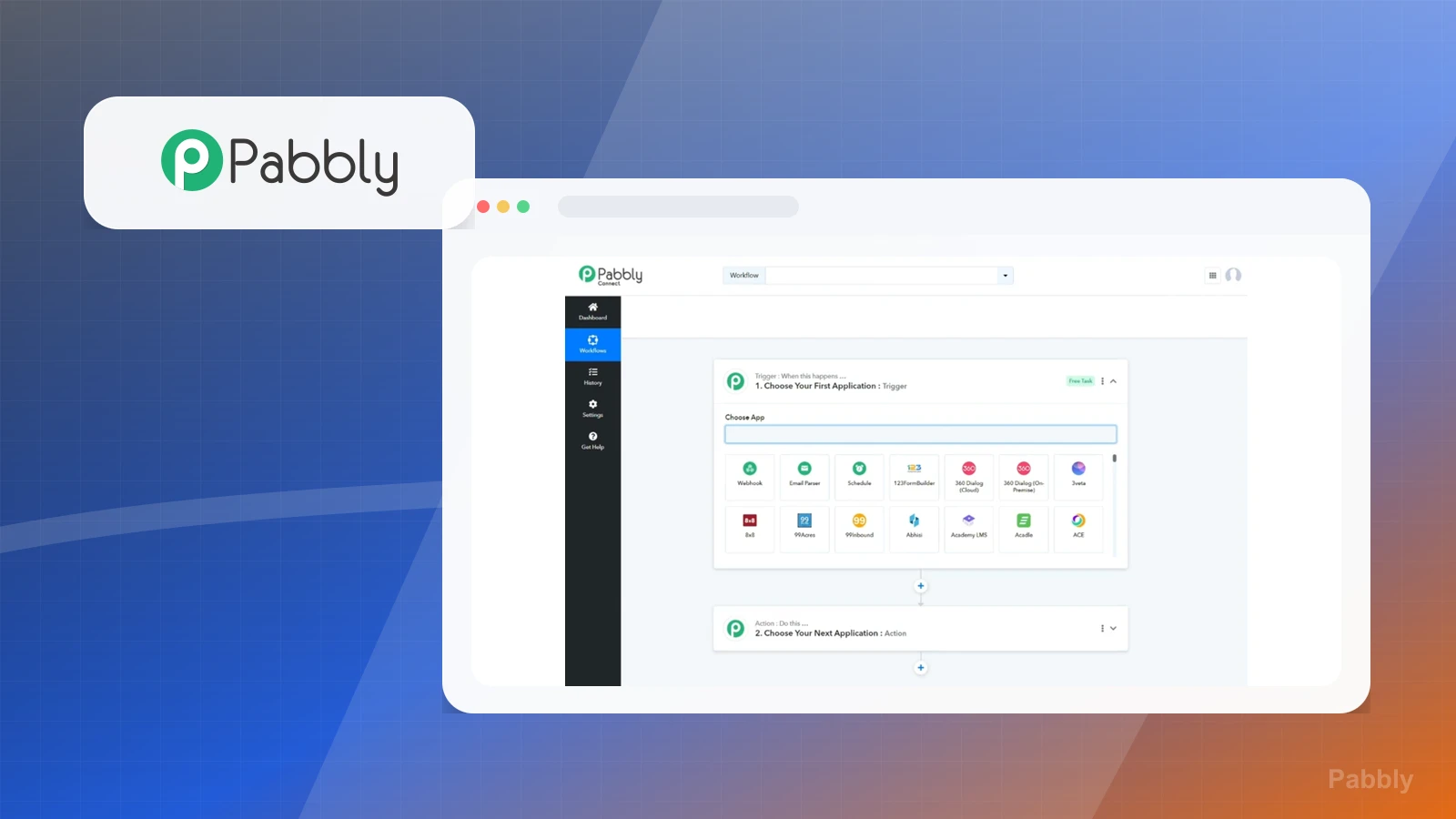
The workflow builder shows a blank trigger app chooser, visible app options, and a collapsed next-application action step.

Practical use

  • Define the source event and destination action before selecting connectors.
  • Check whether the process is stable enough to document field mapping, conditions, ownership, and failure handling.

What this screen does not prove: A blank workflow canvas does not prove that a connector supports the required event, that fields map correctly, or that a task will execute.

Pabbly Connect workflow builderThe builder exposes trigger and action structure before any real app connection or data is configured.

Task history

Locate the task-history review surface

The Task History screen shows Task History and Task Usage by Workflows tabs, zero-value summary cards, a date range, a filter state, and no task history found.

Practical use

  • Identify where an operator would inspect task activity after a workflow is enabled.
  • Add routine history review and failure ownership to the operating plan before automating a critical handoff.

What this screen does not prove: An empty dated history screen does not prove successful runs, failure detection, recovery, retention, monitoring quality, or current account usage.

Pabbly Connect empty task historyThe screen shows where task history can be reviewed, but contains no successful or failed task record.

API and webhooks

Treat custom connection controls as sensitive

The API and Webhooks settings screen shows an empty API-token field with Copy and Generate API Token controls plus Add Webhook controls. No token or webhook URL is visible.

Practical use

  • Decide whether the workflow needs a standard connector, API token, or webhook before assigning technical ownership.
  • Plan secret storage, payload validation, retries, monitoring, and rotation outside public notes and screenshots.

What this screen does not prove: Token and webhook controls do not prove authentication fit, endpoint security, successful execution, delivery, retry behavior, or integration reliability.

Pabbly Connect API and Webhooks settingsThe token field is empty and no webhook URL, credential, connection name, or customer data is visible.

Plain verdict

Should you use Pabbly?

Good fit as an automation layer when the core stack needs integrations but does not need a full agency CRM.

Use this if

  • Workflow automation
  • Budget-conscious operators
  • Creators connecting separate tools

Avoid for now if

  • Users who need native CRM pipelines
  • People with no repeatable workflows yet

Evidence status

Documentation-based with workflow documentation

Last verified: 2026-05-02

Outbound status

Approved affiliate link

Affiliate links are disclosed before product clicks. Review the methodology.

Decision flow

Place Pabbly in the stack decision

Use this path before treating Pabbly as the answer. The product should fit the workflow role, comparison fork, and upgrade timing before an outbound click.

Short answer

Pabbly fits when workflow automation need the stack role it is built for. It is not the right first path if your workflow matches users who need native crm pipelines, so compare the cautions and alternatives before treating it as the first purchase.

Quick take

A workflow automation and business tools suite for connecting apps and reducing manual work.

Paepae Stack positions Pabbly as automation stack, workflow guides, and budget automation content. The fit depends on the workflow, not only the feature list.

The recommendation includes workflow documentation and visible limitation notes, so the page separates what was seen in the workflow from claims that still require stronger proof.

Not ideal for

  • Users who need native CRM pipelines
  • People with no repeatable workflows yet

Strengths

  • Broad automation use case
  • Useful for connecting separate tools
  • Good fit for budget-conscious automation

Cautions

  • Automation should follow a real process
  • Check connector coverage before recommending a workflow

Pricing snapshot

Pabbly suite pricing and automation-related plans can vary by product bundle and task needs.

Start by checking whether the buyer needs Pabbly Connect only or broader Pabbly suite access.

Plan caveats

  • Task volume, workflow count, and bundle scope affect whether Pabbly is a good automation value.
  • Confirm the current Connect-specific pricing path before publishing exact price claims.

Pricing sources

Implementation notes

  • Start by deciding the job Pabbly must do in the stack, then compare it against the nearest alternatives.
  • Write down the trigger, fields, and expected result before building an automation around it.

When to upgrade

  • Upgrade toward Pabbly when the workflow it supports is already visible in the business.
  • Delay the purchase if the tool would create more setup work than customer-facing value this month.

Questions this page answers

Who is Pabbly a good fit for?
Pabbly is a good fit for workflow automation, budget-conscious operators, creators connecting separate tools when that workflow is already the next practical job in the business.
Who should skip Pabbly?
Skip or delay Pabbly if you identify with users who need native crm pipelines or if the tool would add setup work before creating customer-facing value.

Next best action

Decide whether Pabbly fits

The page is past the quarterly review window and should be refreshed before heavier promotion.

Visit Pabbly: Open the approved outbound path after checking the fit notes and plan caveats.

Use Stack Builder: Use the guided path if the right category or stack is still unclear.

Guides

Read before choosing Pabbly

Next steps

Compare or continue