Affiliate disclosure: Some recommended tool links may earn Paepae Stack a commission if you buy through them. Recommendations are based on fit, tradeoffs, evidence, and source notes. Read the disclosure.
Mighty Networks product media preview

Workflow evidence

What the Mighty Networks community workflow looks like

These three PaepaeStack owner-captured Mighty Networks screens show developer documentation, an analytics dashboard, and a sample course-and-community interface at capture time. They are documentation evidence only, not proof of API access, authentication, an API call, integration setup, data access, network ownership, member authenticity, analytics accuracy, activity, earnings, endorsement, or outcomes.

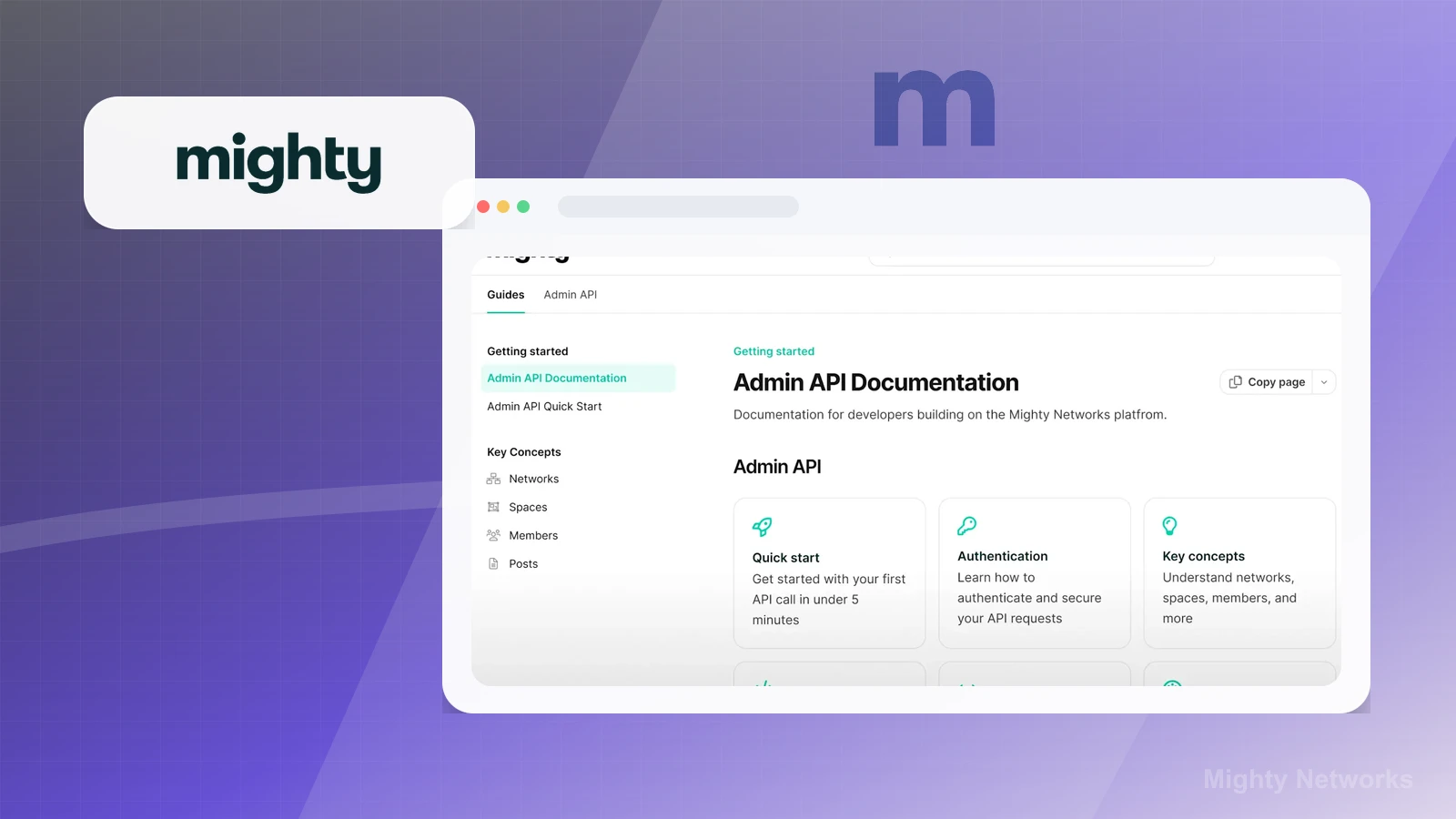
Developer documentation

Inspect the Admin API documentation layout

The developer-documentation screen shows search, Guides and Admin API tabs, navigation for networks, spaces, members, and posts, Quick start, Authentication, Key concepts, and a Copy page control.

Practical use

  • Map the visible documentation topics and navigation before defining an integration or data-access question.
  • Separate documentation discovery from credentials, API calls, permissions, security, support, and availability checks.

What this screen does not prove: Documentation cards, search, tabs, navigation, and quick-start or authentication labels do not prove API access, authentication, an API call, integration setup, data access, developer support, current availability, security, or reliability.

Mighty Networks developer documentation layoutOwner-captured Mighty Networks developer-documentation interface at capture time.

Analytics overview

Review the captured analytics dashboard layout

The analytics dashboard shows overview navigation, date-range and filter controls, summary cards for contribution and member measures, comparison percentages, and line charts.

Practical use

  • Identify the visible analytics controls, summary measures, comparison indicators, and chart surfaces.
  • Define source, attribution, identity, metric-definition, activity, privacy, and retention checks before relying on dashboard values.

What this screen does not prove: Displayed network labels, people, counts, percentages, charts, and dates are capture-time UI only and do not prove authentic members, contributions, activity, attribution, metric accuracy, growth, engagement, retention, revenue, or performance.

Mighty Networks captured analytics dashboardOwner-captured Mighty Networks analytics interface at capture time.

Course and community navigation

Inspect the sample course and community navigation

The sample course-and-community interface shows latest, discovery, events, members, resource navigation, module and chat tabs, progress UI, week sections, lesson counts, course cards, and search and menu controls.

Practical use

  • Map how course, community, resource, module, lesson, progress, and member-facing surfaces are grouped.
  • Keep identity, ownership, consent, enrollment, completion, content quality, moderation, monetization, and outcome checks separate from the sample interface.

What this screen does not prove: Visible names, people, counts, progress, lesson labels, course cards, and promotional or income language do not prove identity, consent, ownership, enrollment, completion, member activity, content quality, earnings, monetization, endorsement, sales, or outcomes.

Mighty Networks sample course and community navigationOwner-captured Mighty Networks course-and-community interface at capture time.

Plain verdict

Should you use Mighty?

Example to explore when community participation is central to the offer, not just a discussion area bolted onto a simple course.

Use this if

  • Community-led creators
  • Membership programs
  • Course communities

Avoid for now if

  • Simple download sellers who only need checkout and file delivery
  • Creators without enough audience interaction to sustain a community
  • Teams that need WordPress-owned memberships or site-native access rules

Evidence status

Documentation-based with workflow documentation

Last verified: 2026-05-27

Outbound status

Approved affiliate link

Affiliate links are disclosed before product clicks. Review the methodology.

Decision flow

Place Mighty in the stack decision

Use this path before treating Mighty as the answer. The product should fit the workflow role, comparison fork, and upgrade timing before an outbound click.

Short answer

Mighty Networks is an under-review candidate for community-led creators when that workflow is already the next bottleneck. Paepae Stack treats this page as documentation-based fit guidance, so it does not prove performance, conversion lift, deliverability, support quality, billing reliability, uptime, or long-term workflow results.

Quick take

A community and membership platform for creators who want courses, events, groups, and member interaction in one branded space.

This is an example to explore while Paepae Stack reviews the workflow. Treat it as documentation-based fit guidance, not as proof of output quality, ad performance, support, billing, or long-term reliability.

Paepae Stack positions Mighty Networks as community-platform planning, course/community fit checks, and future membership-stack comparisons. The fit depends on the workflow, not only the feature list.

The recommendation includes workflow documentation and visible limitation notes, so the page separates what was seen in the workflow from claims that still require stronger proof.

Not ideal for

  • Simple download sellers who only need checkout and file delivery
  • Creators without enough audience interaction to sustain a community
  • Teams that need WordPress-owned memberships or site-native access rules

Strengths

  • Clear fit for community-first education and membership products
  • Combines content, members, and interaction in one platform path
  • Useful comparison point against course tools and WordPress membership plugins

Cautions

  • Keep claims under review until owned community setup, payment, member export, and moderation evidence exists
  • Verify current plan limits, app availability, events, courses, payments, and migration paths
  • Do not imply member engagement, retention, revenue, or community growth outcomes without evidence

What is still under review

This page is useful for workflow-fit research, but it is not a hands-on proof page yet. The captured interface documents visible controls, while completed owned setup evidence is still needed before making stronger claims.

  • Capture a representative setup path with screenshots or notes that support only the visible workflow claims.
  • Verify current plan limits, billing surfaces, export or migration controls, and cleanup path.
  • Keep performance, support, reliability, deliverability, conversion, or revenue claims out until owned evidence supports them.

Pricing snapshot

Community and membership platform plans that vary by community, course, event, member, payment, mobile app, and growth needs.

Start by checking member model, course or event needs, payment setup, moderation, mobile app requirements, member export, and migration risk.

Plan caveats

  • A community platform creates an ongoing facilitation job; plan value depends on member interaction, not feature count alone.
  • Paid communities, courses, events, branding, native apps, and payment needs can change the practical plan requirement.

Pricing sources

Implementation notes

  • Start by deciding the job Mighty must do in the stack, then compare it against the nearest alternatives.
  • Map the course structure, student access, and onboarding emails before choosing plan features.

When to upgrade

  • Upgrade toward Mighty when the workflow it supports is already visible in the business.
  • Delay the purchase if the tool would create more setup work than customer-facing value this month.

Questions this page answers

Who is Mighty a good fit for?
Mighty is a good fit for community-led creators, membership programs, course communities when that workflow is already the next practical job in the business.
Who should skip Mighty?
Skip or delay Mighty if you identify with simple download sellers who only need checkout and file delivery or if the tool would add setup work before creating customer-facing value.

Next best action

Decide whether Mighty fits

The page is past the quarterly review window and should be refreshed before heavier promotion.

Visit Mighty: Open the approved outbound path after checking the fit notes and plan caveats.

Use Stack Builder: Use the guided path if the right category or stack is still unclear.

Next steps

Compare or continue