Affiliate disclosure: Some recommended tool links may earn Paepae Stack a commission if you buy through them. Recommendations are based on fit, tradeoffs, evidence, and source notes. Read the disclosure.
Text / LiveChat product media preview
Chat workspaceReview the conversation workspace

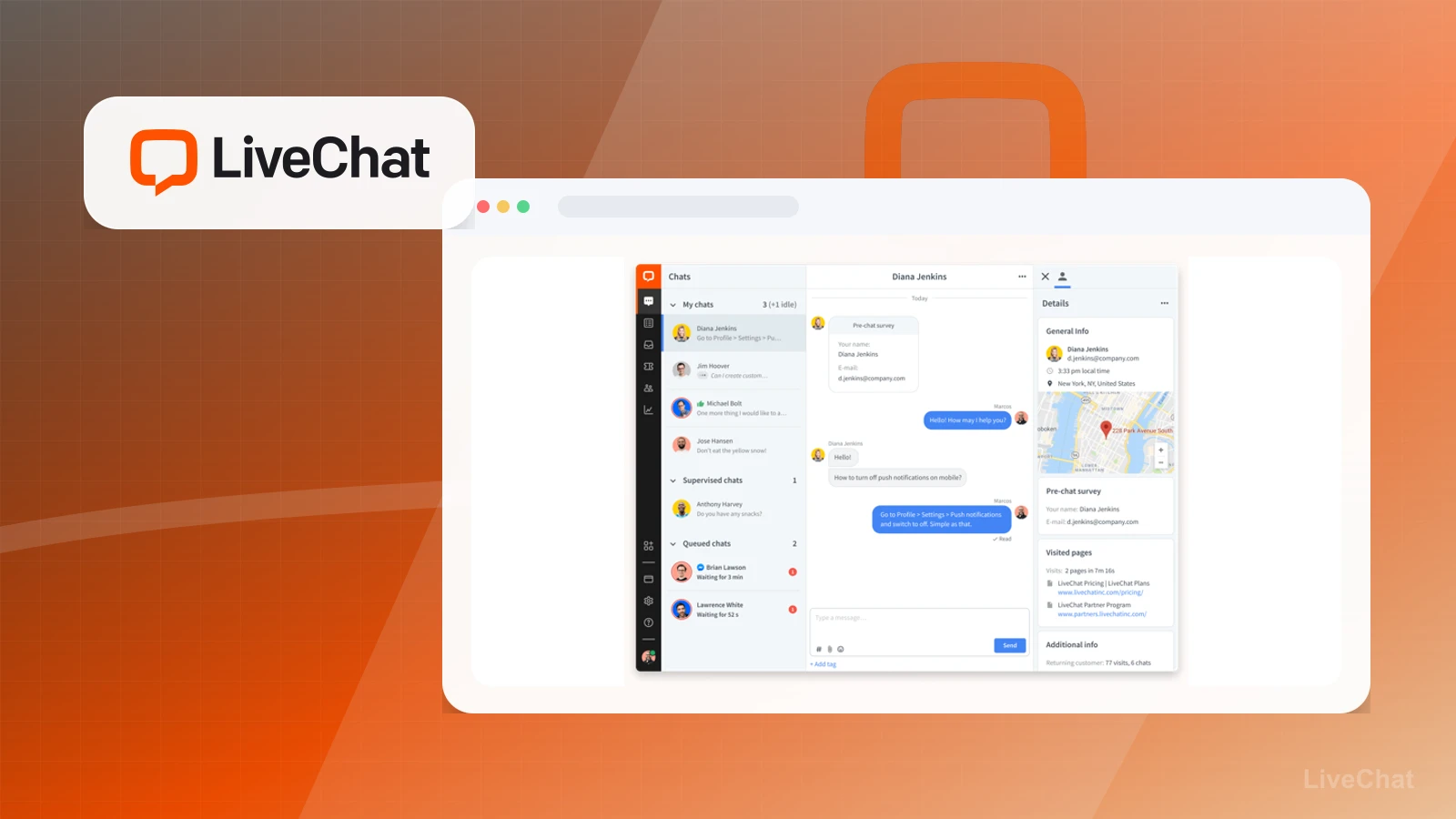
PaepaeStack owner-captured reference screen showing chat-list, conversation, and visitor-detail surfaces. Example identities and locations are captured interface content, not independent evidence of response speed, location accuracy, or support outcomes.

Workflow evidence

What the Text / LiveChat support workflow looks like

These three PaepaeStack owner-captured LiveChat screens show widget, marketplace, and chat-workspace structure with example contact, location, message, price, rating, quantity, and claim content visible at capture time. They are documentation evidence only, not proof that chat, installation, routing, integrations, or customer records worked for PaepaeStack.

Widget customization

Inspect the widget editor

The customization screen shows widget content, appearance, position, mobile, and additional-tweak entry points with a preview.

Practical use

  • List the content, visual, position, and mobile choices that need approval before installation.
  • Plan accessibility, consent, privacy, performance, and responsive checks as separate launch requirements.

What this screen does not prove: A widget editor and preview do not prove that the widget was installed, saved, published, accessible, fast, or compatible with a real site.

LiveChat widget customizationOwner-captured vendor-provided product screen preserving widget customization controls and preview.

Integrations

Review the integration marketplace

The marketplace screen shows search, category filters, app cards, and example connection-status labels.

Practical use

  • Identify candidate app categories before checking the current plan, permissions, data fields, and support documentation.
  • Separate marketplace discovery from authentication, synchronization, monitoring, privacy, and failure handling.

What this screen does not prove: Marketplace listings and example status labels do not prove plan availability, successful authentication, data movement, synchronization, or integration reliability.

LiveChat integration marketplaceOwner-captured vendor-provided product screen preserving integration-discovery controls and app cards.

Chat workspace

Map the conversation-support panels

The vendor demonstration workspace shows chat queues, a conversation, visitor-detail panels, a map, survey fields, visited-page context, and additional information.

Practical use

  • Identify which conversation and visitor-context panels an operator would need to handle carefully.
  • Plan privacy, data-minimization, consent, retention, access-control, staffing, and escalation requirements before use.

What this screen does not prove: Vendor demonstration contacts, messages, locations, maps, and page context do not establish real customer identity, location accuracy, message delivery, support quality, or PaepaeStack account use.

LiveChat demonstration chat workspaceOwner-captured vendor-provided demonstration screen preserving the layout of chat and visitor-context panels.

Plain verdict

Should you use LiveChat?

Good fit as a support layer after a creator or small business has enough inbound conversations to justify live chat.

Use this if

  • Small business support
  • Service sites
  • Higher-touch sales pages

Avoid for now if

  • Pre-launch creators
  • Newsletter-only businesses
  • Sites without meaningful inbound traffic

Evidence status

Documentation-based with workflow documentation

Last verified: 2026-05-02

Outbound status

Approved affiliate link

Affiliate links are disclosed before product clicks. Review the methodology.

Decision flow

Place LiveChat in the stack decision

Use this path before treating LiveChat as the answer. The product should fit the workflow role, comparison fork, and upgrade timing before an outbound click.

Short answer

Text / LiveChat fits when small business support need the stack role it is built for. It is not the right first path if your workflow matches pre-launch creators, so compare the cautions and alternatives before treating it as the first purchase.

Quick take

A customer support chat and help desk option for business websites that need live chat, chatbot, or support workflows.

Paepae Stack positions Text / LiveChat as customer support stack, website chat guides, and small-business retention content. The fit depends on the workflow, not only the feature list.

The recommendation includes workflow documentation and visible limitation notes, so the page separates what was seen in the workflow from claims that still require stronger proof.

Not ideal for

  • Pre-launch creators
  • Newsletter-only businesses
  • Sites without meaningful inbound traffic

Strengths

  • Clear support add-on category
  • Good for retention and sales conversations
  • Can fit WordPress and agency content

Cautions

  • Usually not a first purchase
  • Support coverage expectations should be realistic

Pricing snapshot

Customer-support and live-chat plans that scale by support workflow, seats, and feature needs.

Start by checking seat count, chat volume, widget needs, chatbot/help desk features, and reporting requirements.

Plan caveats

  • Live chat usually should not be a first purchase unless inbound conversations already justify it.
  • Seat-based or support-workflow needs can change the practical cost for a small team.

Pricing sources

Implementation notes

  • Start by deciding the job LiveChat must do in the stack, then compare it against the nearest alternatives.
  • Assign response ownership before adding live chat or support channels to high-traffic pages.

When to upgrade

  • Upgrade toward LiveChat when the workflow it supports is already visible in the business.
  • Delay the purchase if the tool would create more setup work than customer-facing value this month.

Questions this page answers

Who is LiveChat a good fit for?
LiveChat is a good fit for small business support, service sites, higher-touch sales pages when that workflow is already the next practical job in the business.
Who should skip LiveChat?
Skip or delay LiveChat if you identify with pre-launch creators or if the tool would add setup work before creating customer-facing value.

Next best action

Decide whether LiveChat fits

The page is past the quarterly review window and should be refreshed before heavier promotion.

Visit LiveChat: Open the approved outbound path after checking the fit notes and plan caveats.

Compare LiveChat: Use the closest comparison when the product still feels close to another option.

Use Stack Builder: Use the guided path if the right category or stack is still unclear.

Guides

Read before choosing LiveChat

Next steps

Compare or continue