Affiliate disclosure: Some recommended tool links may earn Paepae Stack a commission if you buy through them. Recommendations are based on fit, tradeoffs, evidence, and source notes. Read the disclosure.
Cloudways product media preview
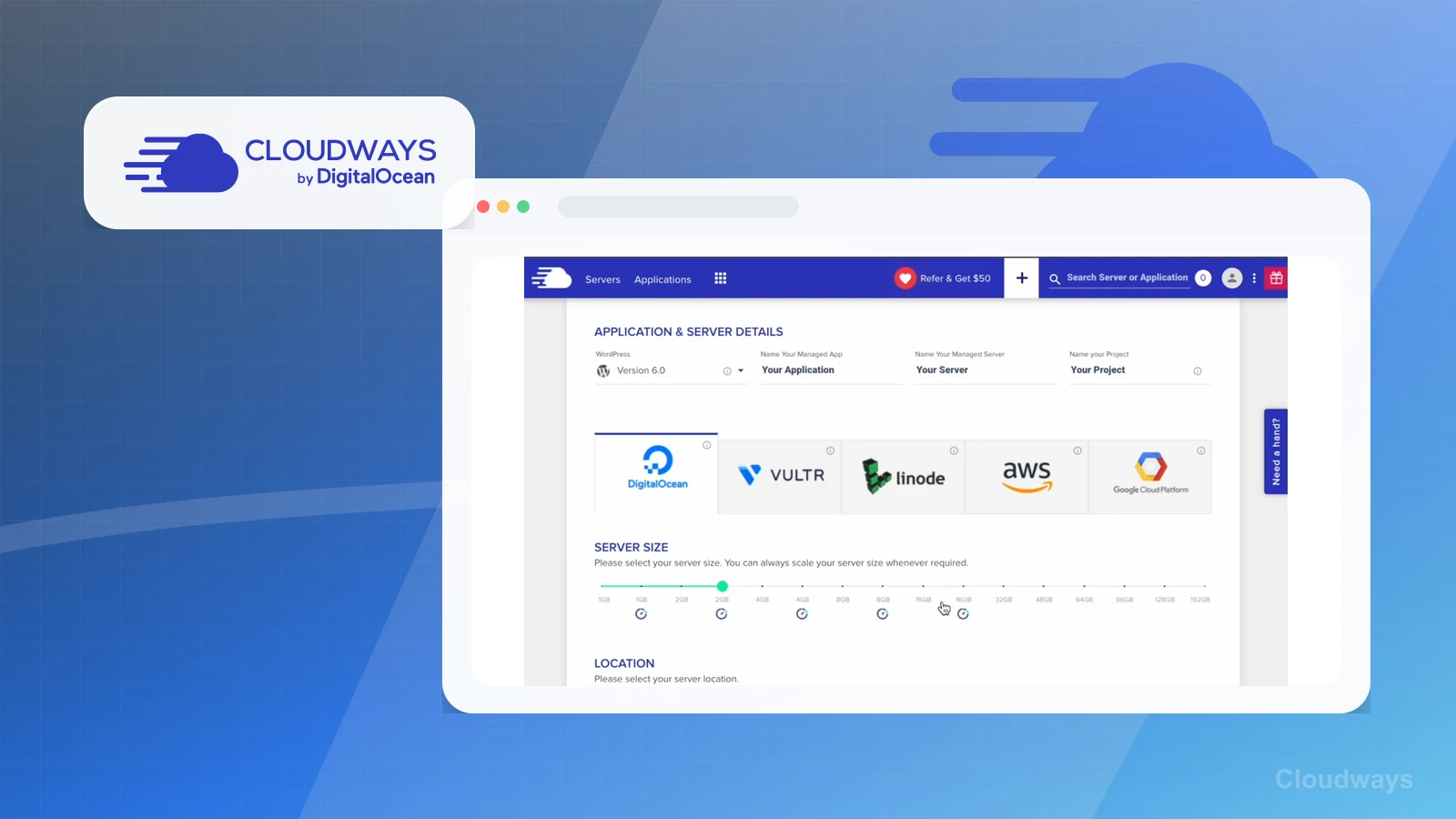
Server launchMap the server launch choices

Use the provider, server-size, location, application, and project fields to identify decisions that need an owner before migration.

Workflow evidence

What the Cloudways hosting-operations workflow looks like

These repository-held Cloudways product screens were recorded in authenticated historical source as owner-captured managed-cloud screenshots. They show configuration and operational surfaces, but they do not upgrade this page beyond documentation-based review or prove real-world hosting outcomes.

Server launch

Assign the launch decisions before provisioning

The launch surface shows application, server, project, provider, size, and location choices before a managed server is provisioned.

Practical use

  • Record who owns the application, server, region, sizing, DNS, and migration decisions before starting a move.
  • Compare the added infrastructure choices with a simpler WordPress-only hosting path.

What this screen does not prove: A launch form does not prove speed, uptime, successful provisioning, migration quality, plugin compatibility, or DNS readiness.

Cloudways server launch choicesThe launch screen makes the number of hosting decisions visible before a WordPress site is moved.

SSL setup

Plan certificate and domain work

The SSL Management surface shows where an operator selects a certificate path and supplies the related email and domain information.

Practical use

  • Add certificate selection, domain mapping, DNS validation, and renewal ownership to the migration checklist.
  • Keep SSL setup separate from the later checks needed before public traffic moves.

What this screen does not prove: An SSL form does not prove DNS propagation, successful issuance, renewal reliability, cache safety, or a clean migration.

Cloudways SSL management surfaceBlank fields and generic names keep the capture useful without exposing account or domain information.

Monitoring

Inspect the monitoring surface before choosing alerts

The monitoring summary presents server-health status and resource categories for RAM, CPU, disk, and bandwidth.

Practical use

  • Identify which resource signals an operator can inspect and which alerts or escalation paths still need to be defined.
  • Use the categories to plan observation after migration rather than treating a dashboard as proof of performance.

What this screen does not prove: Example health and usage values do not prove production capacity, normal utilization, uptime, speed, or future incident detection.

Cloudways monitoring summaryThe monitoring categories show where resource checks happen, not whether a particular site will perform well.

Service controls

Understand the operational controls and risks

The Manage Services surface shows status and available actions for web, database, cache, monitoring, and runtime services.

Practical use

  • Identify which services a technical operator may need to restart, enable, disable, purge, or investigate.
  • Document ownership and rollback steps before changing a production service state.

What this screen does not prove: Visible controls do not prove that changing a service is safe, that the current state is correct, or that an incident will be resolved.

Cloudways service management controlsService controls increase operational flexibility and the need for careful ownership and rollback procedures.

Support entry points

Map support routes before an incident

The Support Center surface shows chat, ticket, community, knowledge-base, account, billing, and server-administration entry points.

Practical use

  • Locate the available support paths before launch and decide which issues belong in chat, tickets, documentation, or internal escalation.
  • Record account and billing ownership separately from technical incident response.

What this screen does not prove: A support menu does not prove response time, expertise, resolution quality, priority handling, availability, or satisfaction.

Cloudways Support CenterThe screen shows where support requests can begin, not how a real request will be handled or resolved.

Plain verdict

Should you use Cloudways?

Good fit for freelancers and technical WordPress users comparing managed cloud flexibility against premium managed WordPress hosting.

Use this if

  • Freelancers managing site hosting
  • Cloud hosting comparison shoppers
  • Technical WordPress users wanting flexibility

Avoid for now if

  • Non-technical beginners
  • Creators who want a hosted all-in-one platform
  • Simple newsletter-only businesses

Evidence status

Documentation-based with workflow documentation

Last verified: 2026-05-02

Outbound status

Approved affiliate link

Affiliate links are disclosed before product clicks. Review the methodology.

Decision flow

Place Cloudways in the stack decision

Use this path before treating Cloudways as the answer. The product should fit the workflow role, comparison fork, and upgrade timing before an outbound click.

Short answer

Cloudways is worth reviewing when a freelancer, developer, or technical WordPress operator wants managed cloud hosting flexibility instead of a WordPress-only hosting path. Paepae Stack treats this page as documentation-based, so it does not prove speed, uptime, support quality, migration quality, or long-term reliability.

Quick take

Managed cloud hosting for site owners and freelancers who want more infrastructure flexibility than a WordPress-only hosting path.

Paepae Stack positions Cloudways as hosting alternatives, developer/freelancer stack, and kinsta comparisons. The fit depends on the workflow, not only the feature list.

The recommendation includes workflow documentation and visible limitation notes, so the page separates what was seen in the workflow from claims that still require stronger proof.

Not ideal for

  • Non-technical beginners
  • Creators who want a hosted all-in-one platform
  • Simple newsletter-only businesses

Strengths

  • Cloud-provider and server flexibility
  • Developer and freelancer fit
  • Useful Kinsta comparison angle when technical control matters

Cautions

  • Separate hosting adds maintenance compared with hosted all-in-one tools
  • Infrastructure choices can confuse beginners
  • Flexibility is only useful when someone can own the extra decisions

Pricing snapshot

Managed cloud hosting pricing that varies by cloud provider, server size, and resource usage.

Start by checking provider, RAM, storage, bandwidth, backups, and managed-service needs.

Plan caveats

  • Cloud flexibility can create more decisions than a non-technical creator wants.
  • Hosting costs can change as traffic, storage, and performance requirements grow.

Pricing sources

Implementation notes

  • Start by deciding the job Cloudways must do in the stack, then compare it against the nearest alternatives.
  • Confirm someone can own cloud-provider, server-size, backup, DNS, cache, and migration decisions before choosing Cloudways.
  • Use the Kinsta comparison if the real preference is a calmer WordPress-focused managed hosting lane.
  • Document rollback and migration steps before moving an existing WordPress site.

When to upgrade

  • Move toward Cloudways when the operator wants managed cloud flexibility and can own server-level choices.
  • Upgrade hosting after traffic, client work, app requirements, or infrastructure needs make basic hosting too limiting.
  • Delay Cloudways if cloud-provider, server-size, DNS, backup, and migration decisions would slow down the business more than they help.

Questions this page answers

When should I compare Kinsta instead?
Compare Kinsta when the site is WordPress-first and the buyer wants a managed WordPress environment with fewer infrastructure decisions.

Next best action

Decide whether Cloudways fits

The page is past the quarterly review window and should be refreshed before heavier promotion.

Visit Cloudways: Open the approved outbound path after checking the fit notes and plan caveats.

Compare Cloudways: Use the closest comparison when the product still feels close to another option.

Use Stack Builder: Use the guided path if the right category or stack is still unclear.

Guides

Read before choosing Cloudways

Next steps

Compare or continue